

Understanding Terminologies
- Good Faith Exam
A Good Faith Exam (GFE) is a documented medical evaluation performed by a qualified provider to assess a patient’s condition and determine their eligibility for aesthetic treatment. It ensures the provider acts in good faith by reviewing the patient’s medical history, risks, and suitability for services, supporting patient safety and regulatory compliance.
View a Patient’s Good Faith Exam in Their Profile
-
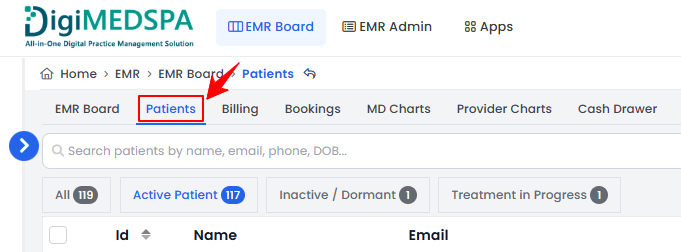
The user can view a patient’s GFE through the patient profile by accessing Patients List Screen from two entry points.
-
From the EMR Board Tabs, click on ‘’Patients.’’
-
From the Left Navigation, click on the “EMR Board” dropdown menu and select “Patients.’’ Alternatively, you can type “Patients” into the search bar in the Left Navigation.
-
-
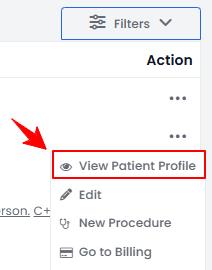
To view a specific patient from the list, click the three dots under the action column and select "View Patient Profile," or simply click anywhere on the patient’s data.
-
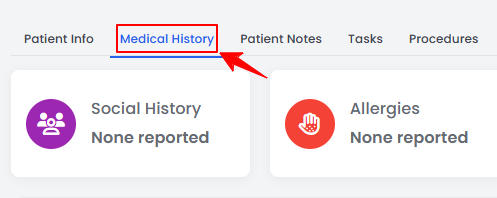
From the patient profile, click on the “Medical History” tab.
-
In the Medical History tab, the Good Faith Exams (GFE) section displays all exams associated with the patient. Completed exams appear with the submission date, while exams that are still in progress show an “Edit” icon and an In Progress status. Click the “Edit” icon to open and complete a pending exam, or click the exam name to view a completed and signed GFE.
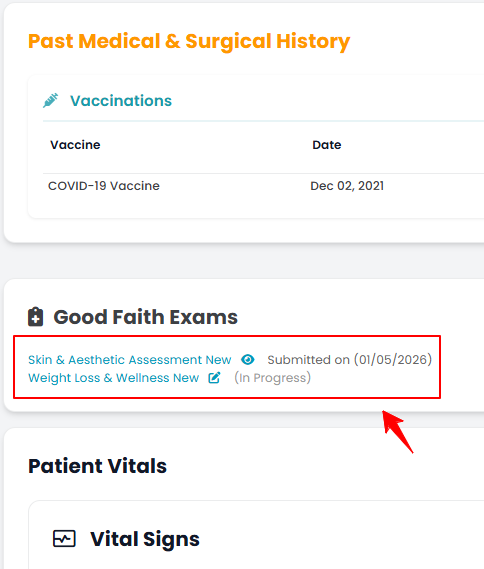 NoteWhen a patient books an appointment, the GFE linked to the booked service will appear as attached. During procedure creation for that booking, the user can have the patient sign the GFE, and it will then be displayed here in the patient’s profile.
You’re all set
That’s every step of “How to View a Patient’s Good Faith Exam in Their Profile”. Up next: View Patient’s Vitals Graph.