

Understanding Terminologies
- Past Procedures
Past procedures are previously completed medical or aesthetic treatments recorded in the patient’s profile.
- Upcoming Procedures
Upcoming procedures are scheduled medical or aesthetic treatments planned for a future date.
View a Patient's Past and Upcoming Procedures
-
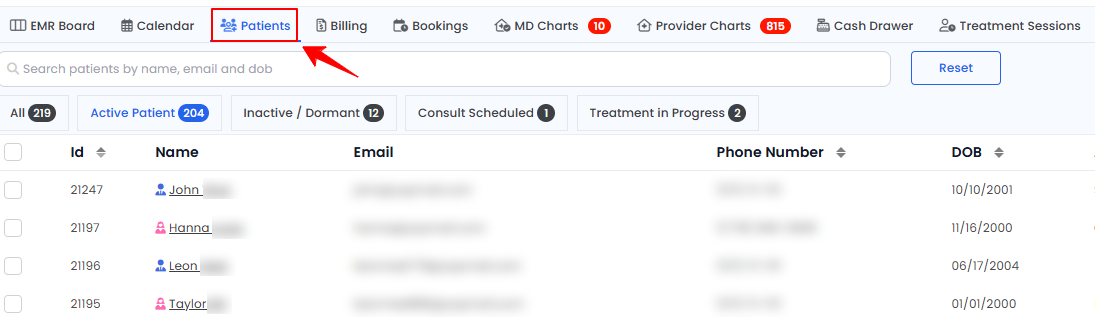
The user can view a patient’s past and upcoming procedures by accessing the Patients List Screen. From the EMR Board Tabs, select “Patients.’’
-
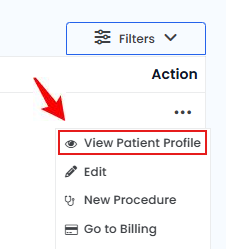
From the patient listing, click on three dots under the action column and select "View Patient Profile" for the specific patient.
-
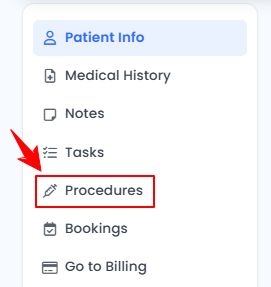
On the Patient Information Screen, the user will find a detailed overview of the patient’s information. To view the procedures, click ‘’Procedures’’ from the side panel.
-
Clicking the Procedures tab will display all procedures, each labeled according to their current status labeled as "Finished," "In Process," “Pending Provider Signature,” or “Billing.” The ‘’Cosmetic Timeline’’ presents both past and upcoming procedures, which can be identified by their dates mentioned. Each procedure is organized into clearly defined boxes, displaying Procedure Images, Consent, Intake Form, Traceability, Notes, Invoice, and e-Prescribing. A green tick indicates completed sections, while a red cross highlights incomplete ones, providing a clear and structured overview.
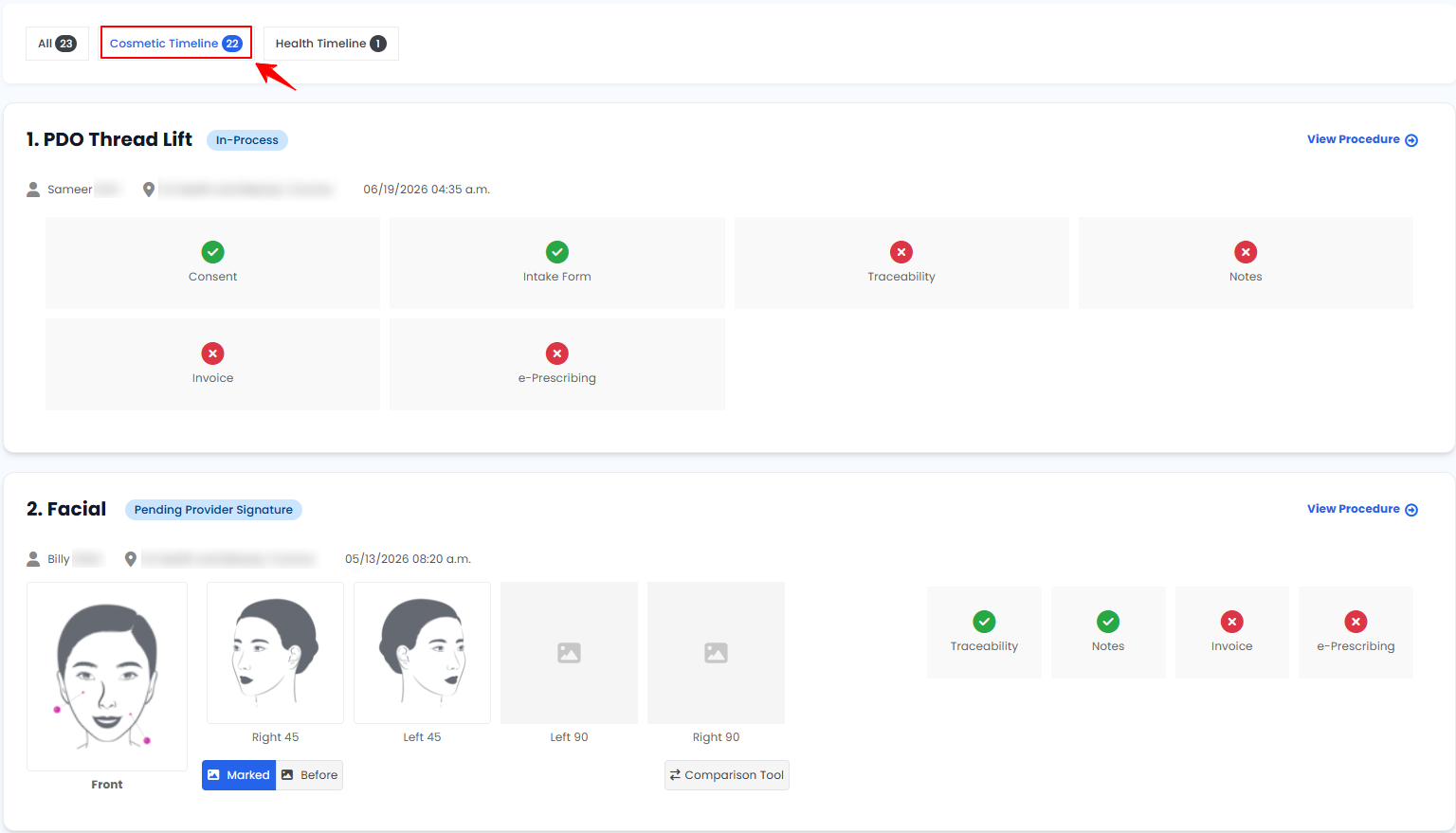 Note''Finished'' means the procedure has been fully completed, including all necessary documentation, approvals, and signatures. ''In Process'' means the procedure is ongoing or has pending steps, such as documentation, approvals, or follow-ups. ”Pending Provider Signature” refers to a procedure that has not been signed by the provider yet. “Billing” is the stage after a procedure is completed but before payment is received. It involves generating invoices, applying discounts or memberships, submitting claims if needed, and awaiting final payment. ''Procedure Images'' are the photos taken before, during, or after a procedure for documentation. ''Consent'' is a signed agreement from the patient approving the procedure. An ''Intake Form'' is a form collecting patient health details and treatment preferences. ''Traceability'' tracks product usage and batch details for safety. ''Notes'' are the provider's observations and essential details about the procedure. An ''Invoice'' is a billing summary detailing the procedure's cost and payment status. While “e-Prescribing” is the electronic process of creating, signing, and sending prescriptions directly to a pharmacy, ensuring accuracy, security, and efficiency in medication management.
 -
Health procedures can be viewed by clicking ‘’Health Timeline.’’ The health timeline presents both past and upcoming procedures, which can be identified by their dates mentioned. Each procedure is organized into clearly defined boxes, displaying Consent, Intake Form, Traceability, Notes, Invoice, and e-Prescribing. A green tick marks completed sections, while a red cross marks incomplete ones, ensuring a clear and structured overview.
You’re all set
That’s every step of “View a Patient's Past and Upcoming Procedures”. Up next: How to Invite Users through Patient Profile?.