AI Scribe & Charting Assistant
Spend less time documenting. More time with your patients.
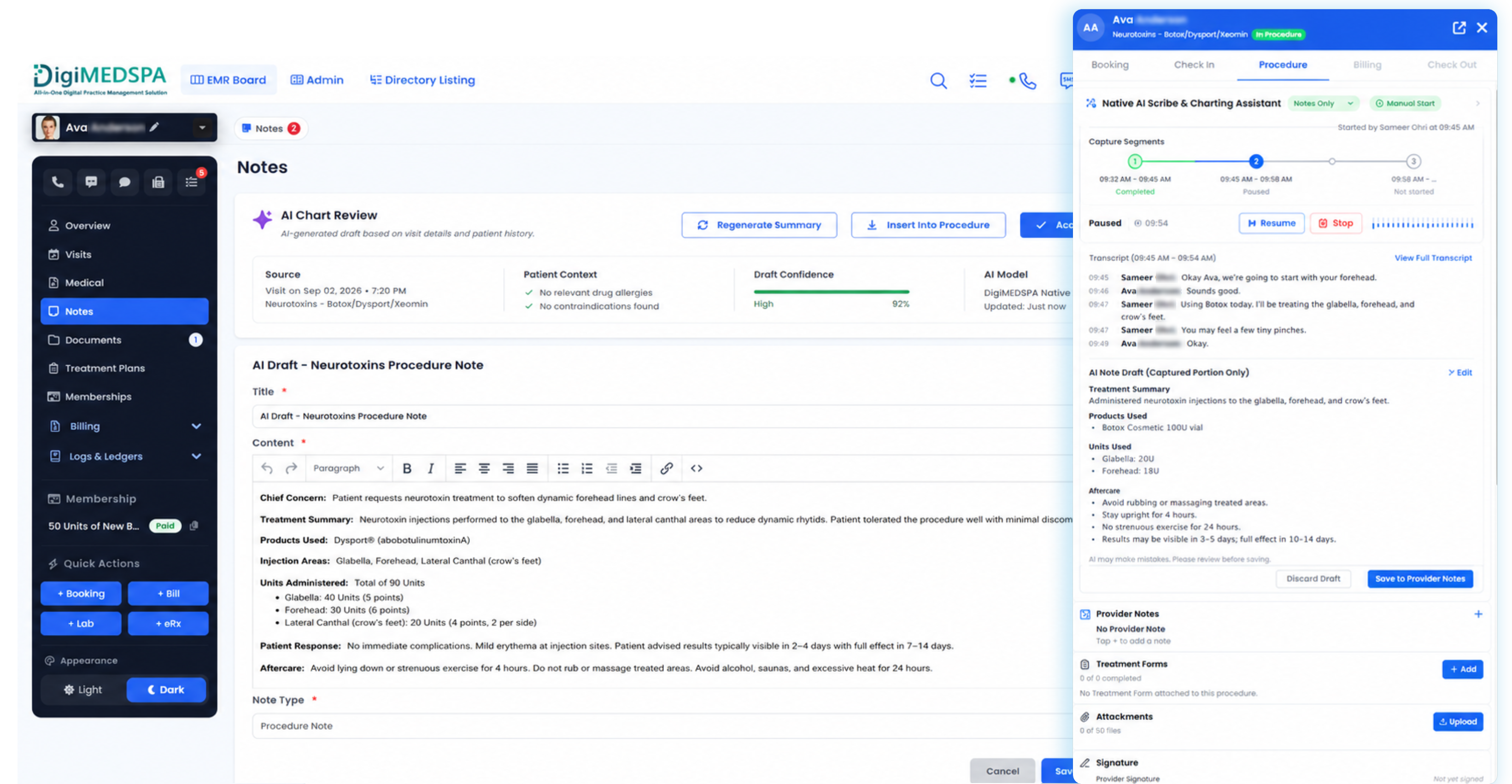
DigiMEDSPA AI Scribe & Charting Assistant is Native AI built directly into the DigiMEDSPA EMR platform.
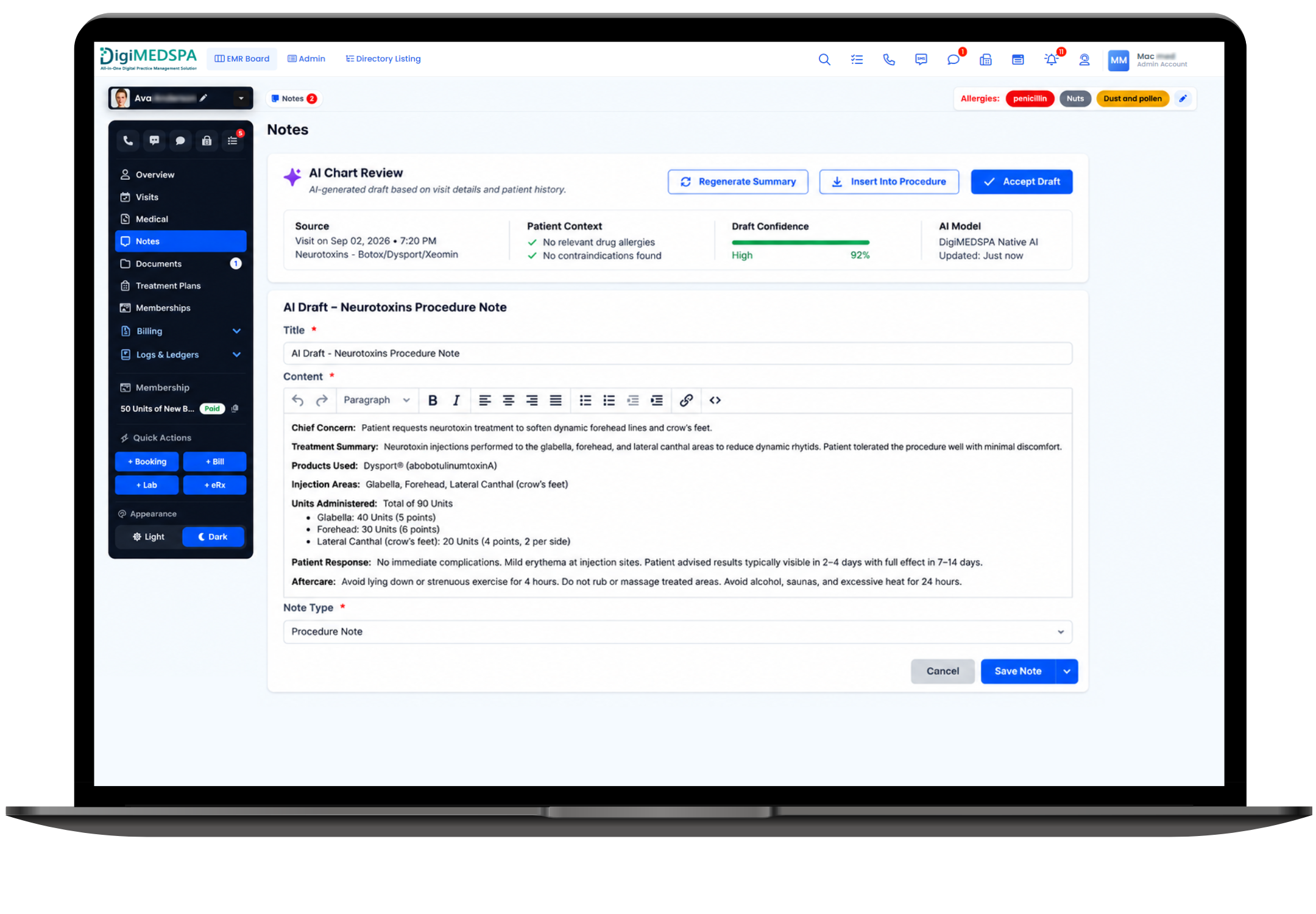
It helps providers capture patient encounters, organize relevant clinical information, generate structured draft notes, assist with procedure documentation, identify missing chart elements, and prepare the record for provider review and signature—all inside the patient’s existing clinical chart.
- No separate scribe application.
- No disconnected patient database.
- No copy-and-paste workflow.
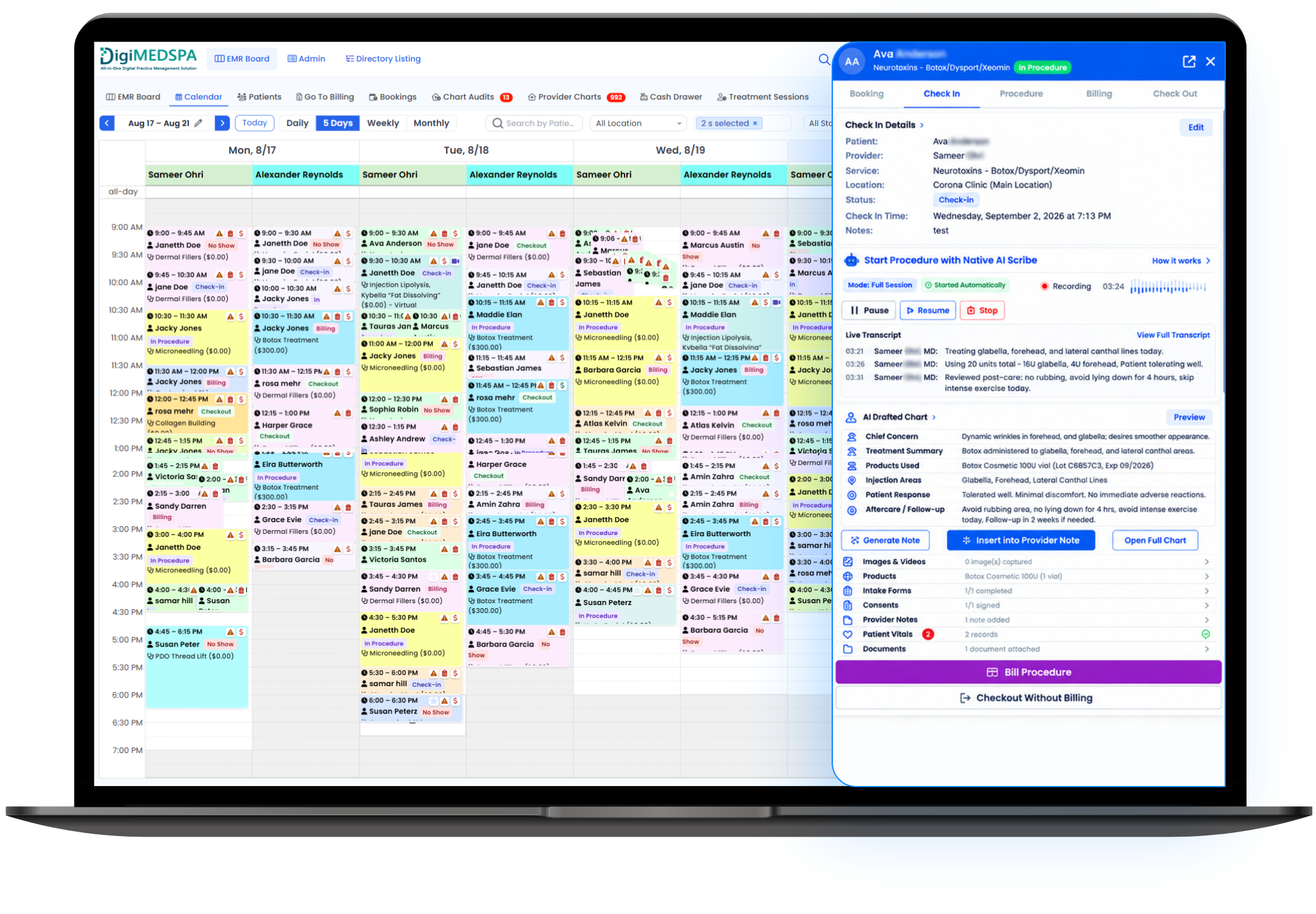
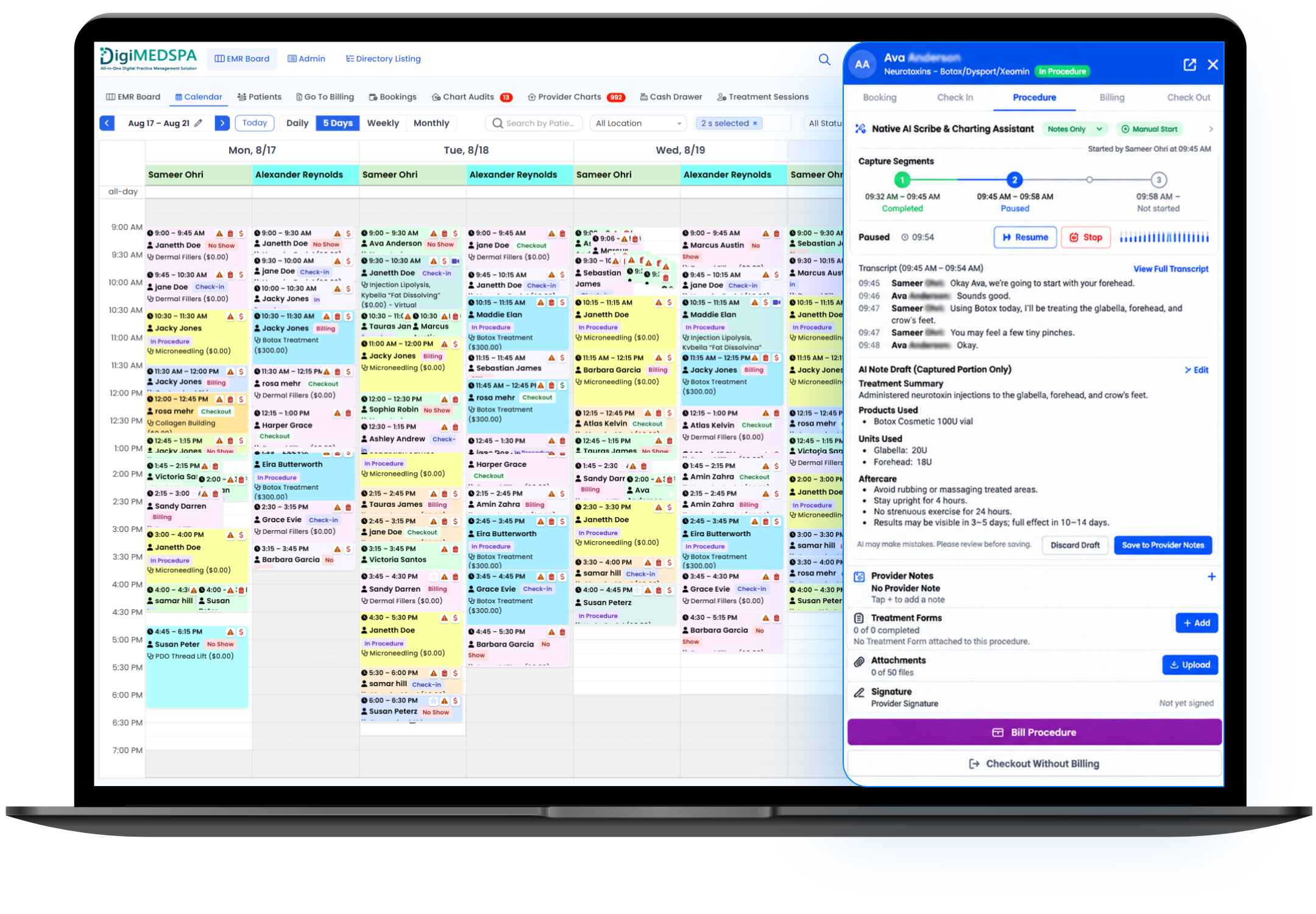
- Native EMR AIAI works directly inside the patient chart.
- Faster DocumentationReduce time spent manually creating clinical notes.
- Provider in ControlAI prepares the draft. The licensed provider reviews, edits, and signs.
One connected documentation experience.
DigiMEDSPA AI Scribe is not another third-party application sitting beside your EMR.
It is designed as a native capability within DigiMEDSPA, working directly with the patient profile, current appointment, clinical chart, procedure documentation, forms, and provider workflow already inside the platform.
Connected directly to
Patient Profile & History
Access permitted patient context and relevant prior history.
Active Encounter
Launch AI Scribe from the current appointment or visit.
Medical / Chart
Create structured documentation directly inside the clinical chart.
Procedures
Assist with treatment and procedure details.
Forms & Intake
Use relevant patient-provided information where permitted.
Labs
Reference authorized lab information where appropriate.
Provider Workflow
- Draft
- Review
- Edit
- Sign
Core Message
The AI lives where the chart lives.
Providers remain inside DigiMEDSPA from the start of the encounter through final documentation and signature.
Listen. Organize. Draft. Review.
AI-Assisted Encounter Documentation
With appropriate patient notice, consent, permissions, and clinic workflow controls, AI Scribe can capture clinically relevant information from the patient encounter and organize it for documentation.
Potential information may include
- Reason for visit
- Patient concerns
- Relevant medical history
- Treatment goals
- Clinical observations
- Treatment discussion
- Procedure information
- Patient response
- Follow-up plan
- Aftercare instructions
The provider remains responsible for reviewing the final documentation.
Structured Chart Note Creation
AI can organize the encounter into the clinic’s preferred documentation format.
Supported workflows may include
- SOAP notes
- Procedure notes
- Consultation notes
- Follow-up notes
- Treatment summaries
- Custom DigiMEDSPA chart templates
More Than Transcription
A transcription service gives the provider a transcript.
DigiMEDSPA AI Scribe & Charting Assistant is designed to turn relevant encounter information into organized clinical documentation directly inside the EMR chart.
Built for aesthetic, wellness, and med spa procedures.
AI can assist with organizing procedure-related information captured during the encounter.
Depending on the clinic’s workflow and procedure, this may include:
- Treatment performed
- Treatment area
- Product used
- Dosage or quantity
- Injection locations
- Device information
- Treatment settings
- Patient tolerance
- Aftercare discussion
- Follow-up recommendations
Providers verify and approve all procedure documentation before signing.
Catch missing information before you sign.
AI Scribe can help identify chart elements that may still require provider attention.
Examples include
- Missing treatment area
- Missing dosage or units
- Incomplete procedure information
- Missing product details
- Unresolved placeholders
- Missing follow-up instructions
- Required chart fields
- Unsigned documentation
This helps reduce incomplete charts while keeping the provider in full control of the final record.
Review the encounter before you document it.
AI can help providers quickly review relevant information from the current encounter and authorized prior history.
Potential summaries include
- Current visit summary
- Previous treatment summary
- Relevant recent procedures
- Treatment response
- Follow-up history
- Recent patient concerns
- Progress over time
From patient encounter to signed chart—all inside DigiMEDSPA.
-
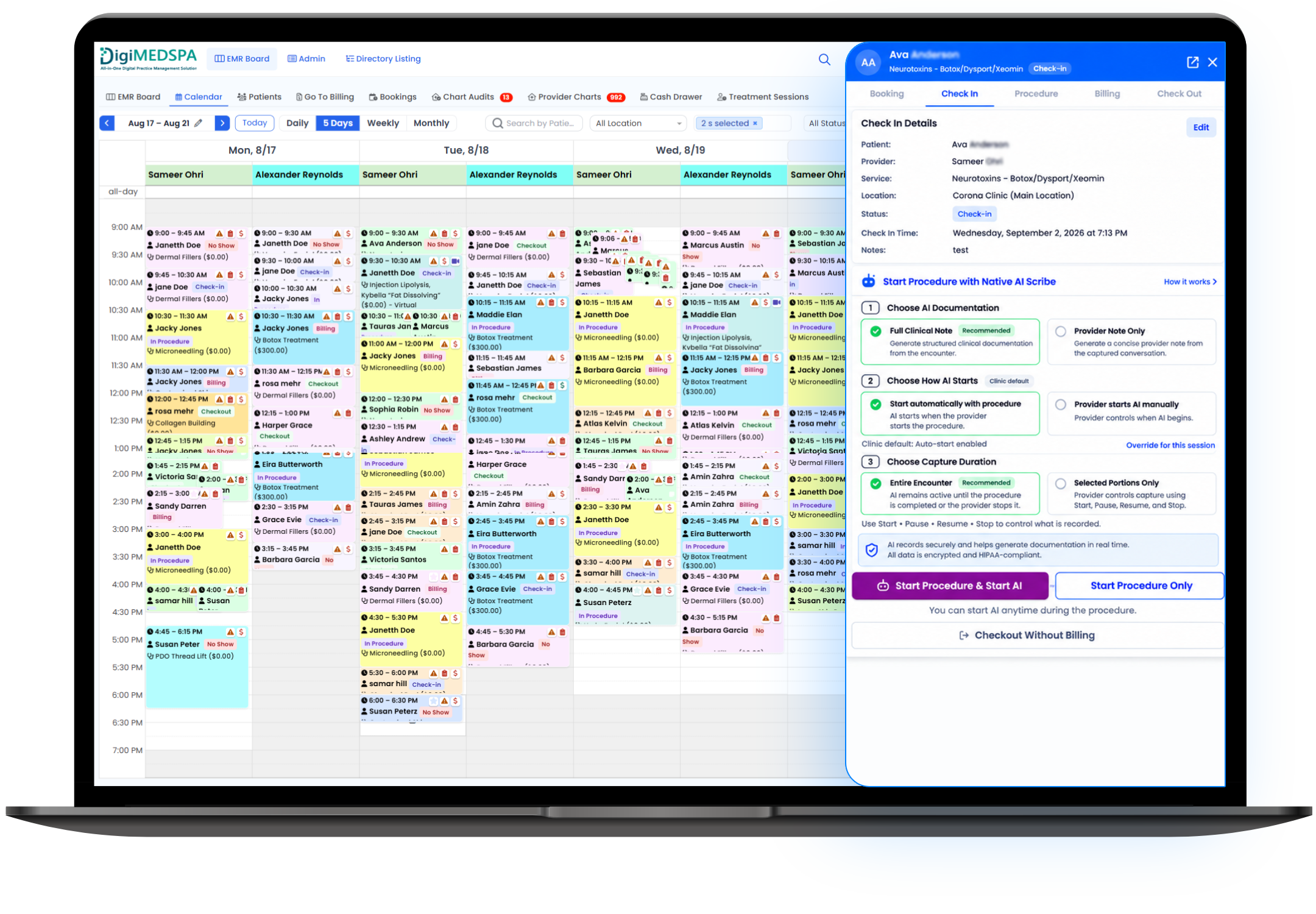
Open the Current Visit
The provider enters:
Patient Profile → Medical / Chart → Current Visit
and activates AI Scribe.
-
Capture the Encounter
AI assists with capturing clinically relevant information while the provider focuses on the patient.
Provider controls can include
- Start
- Pause
- Resume
- Stop
-
AI Organizes the Encounter
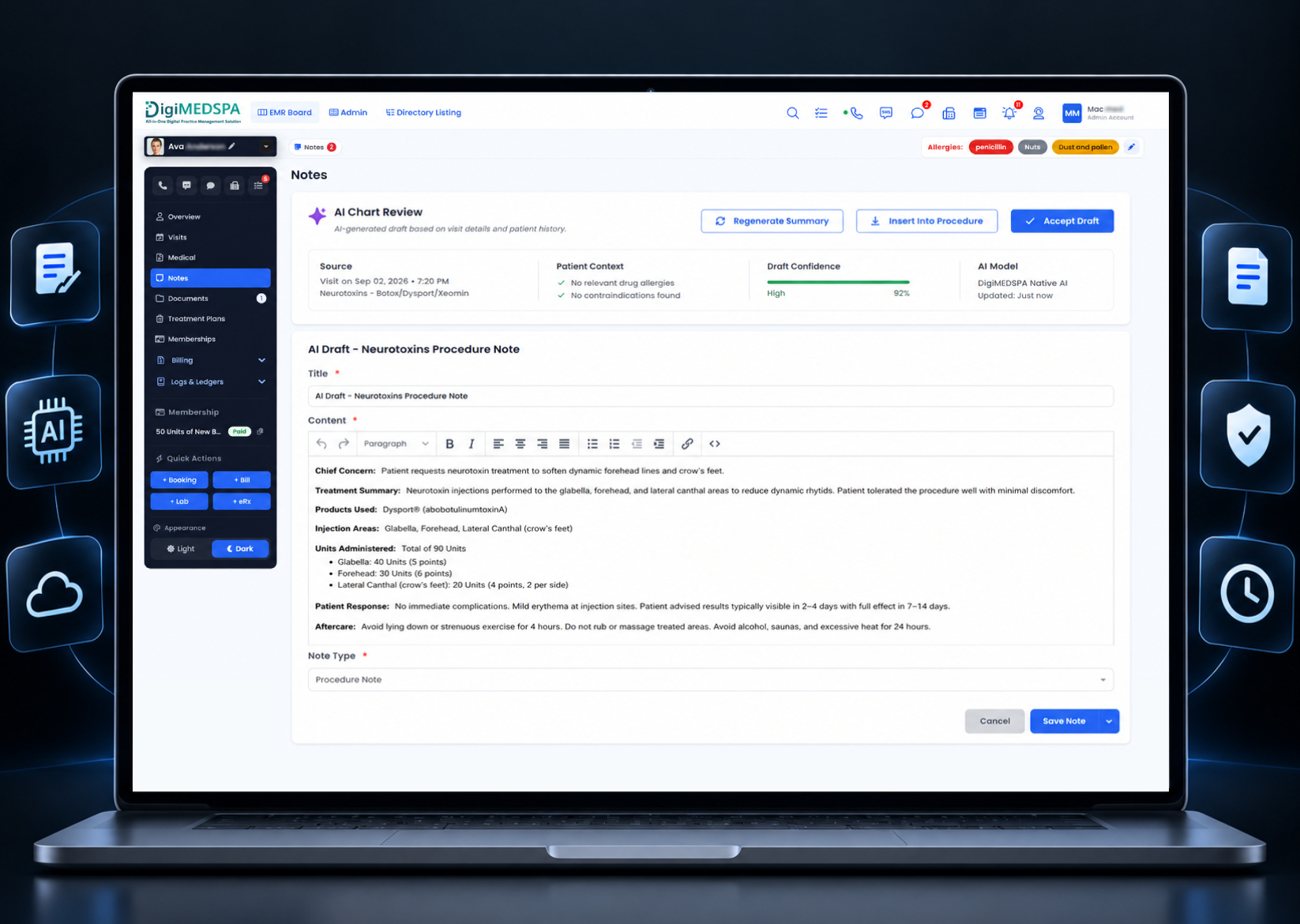
DigiMEDSPA Native AI structures the relevant encounter information into the selected chart-note format.
-
AI Creates the Draft
The provider can review
- Encounter summary
- Subjective
- Objective
- Assessment
- Plan
- Procedure details
- Suggested documentation
- Missing information
- Transcript, where enabled
-
Provider Reviews & Edits
The provider can
- Accept AI-generated content
- Modify sections
- Add information
- Remove information
- Regenerate content
- Complete missing documentation
-
Review & Sign
Once the documentation is accurate and complete, the provider signs the chart using DigiMEDSPA’s existing signing workflow.
Keep Patient Overview for history. Use AI Scribe for the current encounter.
DigiMEDSPA’s existing Patient Profile → Overview continues to serve as the longitudinal summary of the patient’s clinic visits and activity.
AI Scribe works within the active clinical encounter:
Patient Profile → Medical / Chart → Current Visit
This keeps the workflow simple and avoids creating another disconnected clinical workspace.
Current Visit Screen — the provider sees
- Patient Information
- Current Appointment
- Provider
- Visit Type
- Chart Note
- Procedure
- Vitals
- Photos
- Orders
- History
… alongside the Native AI Scribe panel.
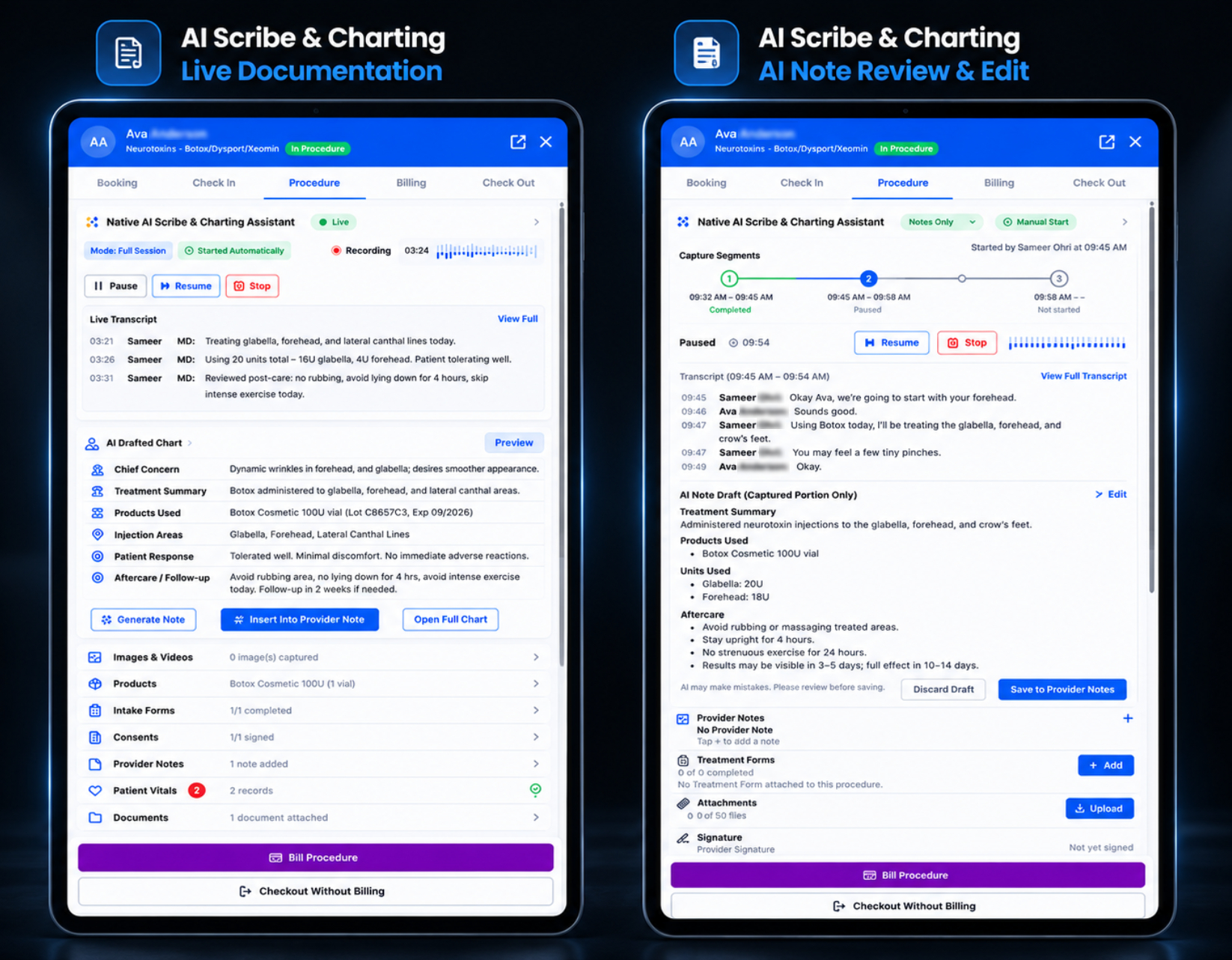
Clinical assistance without leaving the chart.
The right-side Native AI panel can include:
- Listening StatusActive / Paused / Complete
- Encounter SummaryConcise summary of clinically relevant discussion.
- Missing ItemsHighlights information requiring provider attention.
- TranscriptView the encounter transcript where enabled.
Suggested Sections
- Subjective
- Objective
- Assessment
- Plan
- Procedure Details
Quick Actions
- Insert Selected
- Insert All
- Regenerate
- Clear
- Save Draft
- Review & Sign
Purpose-built for med spas, aesthetic practices, and wellness clinics.
Injectable Consultations
Assist with documentation of
- Patient goals
- Concerns
- Relevant history
- Treatment discussion
- Risks and benefits discussed
- Proposed plan
- Follow-up
Injectable Procedures
Help organize
- Product
- Dosage
- Treatment areas
- Injection sites
- Procedure details
- Patient tolerance
- Aftercare
- Follow-up
Weight Management Visits
Assist with
- Progress
- Medication discussion
- Relevant symptoms
- Patient concerns
- Treatment plan
- Follow-up schedule
IV Therapy Visits
Help document
- Screening
- Infusion type
- Relevant clinical information
- Treatment details
- Patient tolerance
- Follow-up
Wellness & Functional Medicine
Organize
- Patient history
- Symptoms
- Lifestyle information
- Lab discussion
- Treatment planning
- Next steps
Follow-Up Visits
Summarize
- Previous treatment
- Patient response
- Progress
- Current concerns
- Changes to plan
- Recommended follow-up
Why Native AI matters.
| Standalone AI Scribe | DigiMEDSPA Native AI Scribe |
|---|---|
| Separate application | Built directly into DigiMEDSPA EMR |
| Separate login | Existing DigiMEDSPA access |
| May require copy/paste | Draft created inside patient chart |
| Limited EMR context | Connected to patient and visit context |
| Separate patient database | Uses authorized DigiMEDSPA patient profile |
| Transcript-first workflow | Structured charting assistance |
| Separate documentation workflow | Encounter → Draft → Review → Sign |
| Separate audit trail | Native DigiMEDSPA activity logging |
| Additional integration dependency | Part of the existing platform workflow |
AI prepares. Providers decide.
DigiMEDSPA AI Scribe & Charting Assistant is a documentation assistant.
It does not independently
- Diagnose a patient
- Determine treatment
- Prescribe medication
- Make clinical decisions
- Approve a medical record
- Sign a note
- Replace provider judgment
Recommended Clinical Disclaimer
AI-generated documentation is a draft and must be reviewed, corrected where necessary, and approved by the licensed provider before becoming part of the final signed medical record.
Healthcare-grade privacy for Native Clinical AI.
Clinical documentation can contain highly sensitive PHI. DigiMEDSPA AI Scribe is designed around healthcare-focused privacy, access, security, and auditing controls.
HIPAA-Aligned Workflows
Designed to support HIPAA-compliant clinical workflows through appropriate administrative, technical, and contractual safeguards.
Minimum Necessary Access
AI should receive only the patient information necessary for the authorized documentation task.
For example, documenting today’s visit may require
- Verified patient identity
- Current appointment
- Relevant clinical context
- Encounter information
- Permitted prior history
It does not require unrestricted access to every patient record or every piece of historical data.
PHI Minimization
Patient information not required for the task can be excluded from AI processing whenever practical.
PHI Masking & Obfuscation
Where appropriate, DigiMEDSPA can minimize, tokenize, mask, or otherwise obscure identifying information before applicable AI processing.
Encryption
Sensitive data should be protected:
- In Transit
- At Rest
using appropriate industry-standard security controls.
Role-Based Access
DigiMEDSPA permissions can control which authorized users may:
- Activate AI Scribe
- View transcripts
- Review AI suggestions
- Access patient context
- Modify chart drafts
- Sign documentation
- Access AI activity
- Configure AI settings
Audit Logging
AI activity can be logged for accountability.
Potential audit events include
- AI Scribe started
- AI Scribe paused
- Patient chart accessed
- Draft generated
- Suggested section inserted
- Provider edits
- Transcript accessed
- Missing information flagged
- Provider review
- Final signature
Business Associate Agreement support for covered healthcare workflows.
For healthcare deployments involving PHI, DigiMEDSPA can operate under an appropriate Business Associate Agreement with the practice.
Where AI or infrastructure subprocessors create, receive, maintain, or transmit PHI on DigiMEDSPA’s behalf, appropriate subcontractor contractual arrangements should be maintained where required.
Typical Relationship
- Healthcare Practice / Covered Entity
- DigiMEDSPA / Business Associate
- Approved AI & Infrastructure Subcontractors
Recommended Website Statement
Designed to support HIPAA-compliant workflows with BAA-backed AI infrastructure where applicable.
Patient data should remain protected.
Recommended DigiMEDSPA Native AI principles include:
- Patient PHI is not used to train public AI models
- AI access is limited to authorized workflows
- Minimum necessary information is provided
- Approved subprocessors are used
- Data-retention controls are applied
- Role-based permissions are enforced
- Sensitive data is encrypted
- AI activity is auditable
- Provider review is required before finalization
Private by Design
Clinical information is processed only for authorized DigiMEDSPA workflows according to configured privacy, security, access, and retention controls.
Give clinics and providers control over encounter capture.
Because AI Scribe may involve audio capture, clinics should be able to configure appropriate notice and consent workflows based on their policies and applicable laws.
Potential controls include
- Patient AI Scribe notice
- Recording consent
- Provider acknowledgment
- Start / Stop controls
- Pause functionality
- Audio-retention settings
- Transcript-retention settings
- Clinic-specific consent language
Measure documentation efficiency.
A future Native AI dashboard can help administrators understand how AI is being used across the practice. Potential metrics include:
- AI-Assisted NotesNumber of clinical notes created with AI assistance.
- Estimated Time SavedEstimated reduction in provider documentation time.
- Drafts Awaiting ReviewAI-created drafts requiring provider action.
- Unsigned NotesCharts awaiting final signature.
- Missing DocumentationCharts with unresolved required information.
- Average Review TimeAverage time from AI draft generation to provider approval.
- Provider AdoptionUsage by provider.
- Documentation Completion RatePercentage of AI-assisted notes successfully finalized.
Documentation that stays where the care happens.
Native to the EMR
AI works directly where providers already document patient care.
One Patient Record
No duplicate clinical database.
Built for Med Spas
Designed around aesthetic, wellness, and med spa workflows.
Provider Controlled
Providers review, edit, and sign the final record.
Faster Documentation
Reduce manual charting and after-hours documentation.
Structured Charting
Move beyond raw transcripts into organized clinical notes.
Secure & Connected
Designed around PHI minimization, role-based access, encryption, audit logging, and BAA-backed deployments.
Document smarter. Stay inside your EMR. Focus on your patients.
DigiMEDSPA AI Scribe & Charting Assistant brings Native AI directly into the clinical documentation workflow your providers already use.
From encounter capture to structured chart creation, provider review, and final signature—everything stays connected inside DigiMEDSPA.
Or call 1 (877) 711-5111
Capture. Chart. Review. Sign. All inside DigiMEDSPA. · Native AI built directly into your EMR platform.
Book a Live Demo
Tell us about your practice and a DigiMEDSPA specialist will walk you through AI Scribe & Charting Assistant.