

Understanding Terminologies
- Wallet Ledgers
Wallet Ledgers are a detailed record of all transactions related to items in a patient’s wallet, including products, services, and promotions. They track when items are added, redeemed, charged, or adjusted, providing a complete history of wallet activity for the patient.
View Wallet Ledgers
-
Users can view “Wallet Ledgers” through a patient’s wallet, which is accessed from the Patients List Screen via two entry points.
-
From the EMR Board Tabs, select “Patients.’’
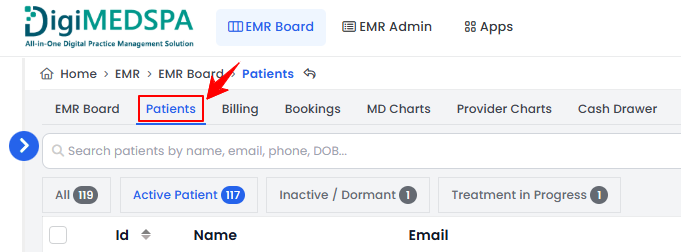
-
From the Left Navigation, click on the “EMR Board” dropdown menu and select “Patients.” Alternatively, you can type “Patients” into the search bar in the Left Navigation.
-
-
From the patient list, click on three dots under the action column and select "View Patient Profile" for the specific patient.
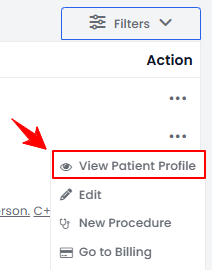
-
Users can view detailed patient information on the patient profile. Hover over “More” and select “Wallet Ledgers.”
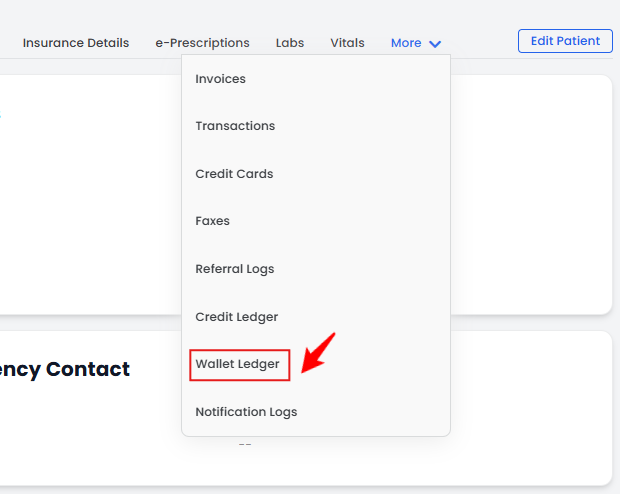
-
The Wallet Ledgers list will display all ledger entries for the selected patient, including details such as Name, Quantity, Amount, Line Item Type, and Created At (date and time of the transaction).Note“Name” is the name of the wallet item (product, service, or promotion). “Quantity” is the number of units of the wallet item involved in the transaction. “Amount” is the monetary value associated with the wallet item for that transaction. “Line Item Type” is the category of the wallet item, such as Product, Service, or Promotion, While, “Created At” is the date and time when the wallet ledger entry was recorded.
You’re all set
That’s every step of “View Wallet Ledgers”. Up next: How to Edit Service or Product Prices and Quantities During Billing?.