

Understanding Terminologies
- Invoice
An invoice is a formal document provided to a patient that lists the medical services or products received, along with their costs, applicable taxes, deposit amounts (if any), payment terms, and the total amount due.
- Export All Invoices
Exporting all invoices refers to downloading a complete record of invoices from the DigiMEDSPA portal in a single excel file. This allows you to review, analyze, and store invoice data for accounting, reporting, audits, or record-keeping outside the system.
How to Export All Invoices
-
The user can access the Invoices List Screen from two entry points:
-
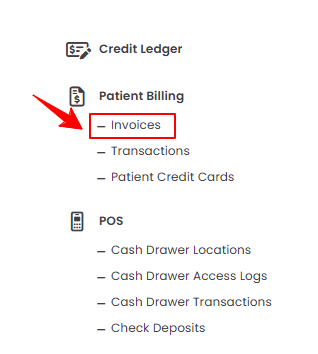
From the EMR Admin, click on “Invoices” under “Patient Billing.”
-
From the Left Navigation, open the “EMR Admin” dropdown menu, select “Patient Billing,” and then choose “Invoices” from the subsequent dropdown menu. Alternatively, you can type “Invoices” into the search bar in the Left Navigation.
-
-
A list of all invoices for all patients will be displayed. Hover over the Actions menu in the top right corner of the screen, choose “Export Invoices CSV” or “Export Invoices PDF” to download all invoices, or select “Export per Item CSV” to download each invoice line item individually for detailed billing information.
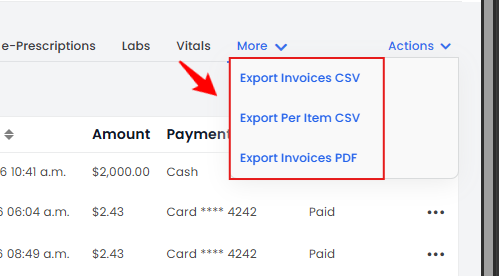 NoteThe “Export per Item CSV” option allows you to export each invoice line item separately, providing detailed information about individual services or products billed, rather than just the overall invoice totals.
The invoices have been successfully exported to your device for review and record-keeping!
You’re all set
That’s every step of “How to Export All Invoices?”. Up next: View Wallet Ledgers.