

This user guide provides detailed steps to change the duration of an existing booking. In our portal, the term "booking" is used to refer to appointments.
Understanding Terminologies
- Duration of a Booking
The duration of a booking is the time set aside for an appointment or service. It shows how long a patient will receive the specific treatment or consultation, helping the Med SPA manage its schedule and resources efficiently.
Part 1 of 2
Change the Duration of a Booking from the Bookings List Screen
-
The user can change the duration of a booking by editing a booking from the Bookings List Screen. From the EMR Board Tabs, select “Bookings.”

-
On the Bookings List Screen, click on three dots under the action column and select "Edit" for the specific booking.
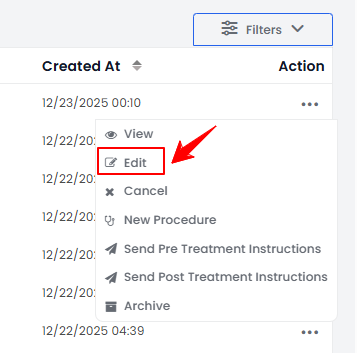
-
In the Duration field change the existing time duration to fit your appointment. Once you finish, click "Update Booking" to save your changes.
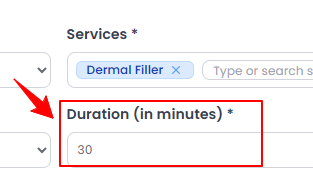 NoteThe booking duration and service duration are the same because the time allocated for a booking is determined by the duration of the selected service.The duration (in minutes) of your booking has been successfully updated and saved.
Part 2 of 2
Change the Duration of a Booking from the Patient Profile
-
The user can adjust the duration of a booking by editing it through the patient profile. From the EMR Board Tabs, click on ‘’Patients.’’
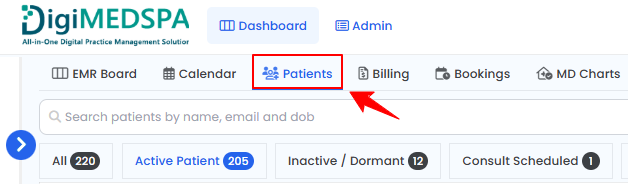
-
To view a specific patient from the list, click the three dots under the action column and select "View Patient Profile," or simply click anywhere on the patient’s data.
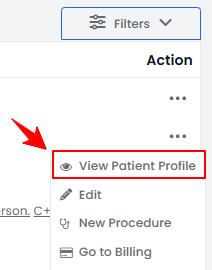
-
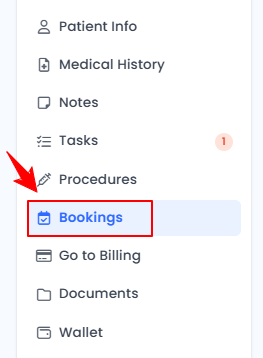
On the Patient Information Screen, users can view a comprehensive overview of the patient’s information. To view the bookings, simply click "Bookings" from the side panel.
-
Click on three dots under the action column and select "Edit" for a specific booking.
-
In the Duration field change the existing time duration to fit your appointment. Once you finish, click "Update Booking" to save your changes.NoteFor detailed instructions on editing a booking refer to our ‘’Edit a Booking’’ user guide.
The duration (in minutes) of your booking has been successfully updated and saved.
You’re all set
That’s every step of “Change the Duration of a Booking”. Up next: Manage Resources.