

Understanding Terminologies
- Provider Commission History
Provider commission history is a detailed record of all commissions earned by a provider over time. It includes information such as the services performed, commission amounts, payment dates, revenue and profit breakdowns, and the status of each commission payment.
View Provider Commission History
-
The user can view provider’s commission history by accessing “Commissions” through two entry points:
-
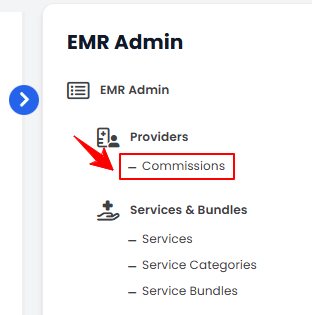
From the EMR Admin, click on “Commissions” under “Providers.”
-
From the Left Navigation, open the “EMR Admin” dropdown, select “Providers,” and then choose “Commissions” from the subsequent dropdown menu. Alternatively, you can type “Commissions” into the search bar in the Left Navigation.NoteBy default, clicking “Commissions” will open the Earnings Overview List Screen.
-
-
There are two ways to access a provider's commission history.
-
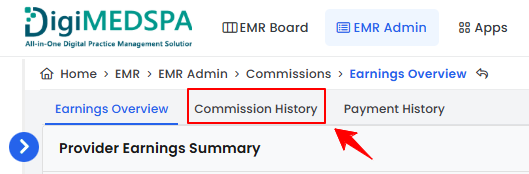
From the menu bar, click on the “Commission History” tab.
-
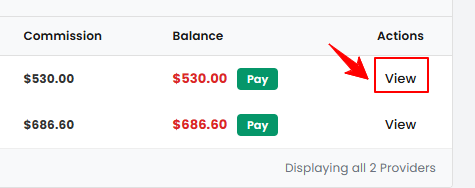
On the Earnings Overview List Screen, click “View” under the Actions column for a provider to view the Commission History List Screen.
-
-
On the Commission History List Screen, click “View” under the Action column to see the details of a specific commission.
-
The Commission Record View Screen will open, showing the commission details, revenue and profit breakdown, and payment status.Note“Revenue & Profit Breakdown” is a summary showing revenue, cost, and profit for products and services, along with the total profit, commission rate, and commission amount payable to the provider. “Payment status” is the current state of the commission payment, indicating whether it is Paid or Unpaid.
-
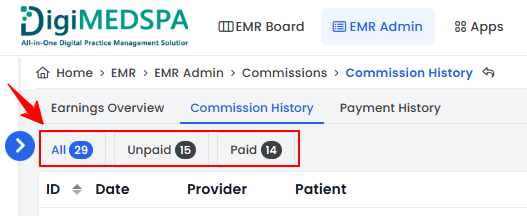
To check a provider’s commission payment status, use the top scopes bar on the Commission History List Screen. Click “Unpaid” to view pending commissions or “Paid” to view commissions that have already been processed.
You’re all set
That’s every step of “View Provider Commission History”. Up next: Reverse Provider Commission Payment.