

Understanding Terminologies
- Provider Charts
Provider Charts are records of procedures performed by providers who are not MDs. In the DigiMEDSPA portal, these charts track the status of each procedure, showing whether it is under Chart Audit, Signed Procedure, Sent to MD, Signed by MD, or Finished, helping ensure proper review, approval, and completion of all non-MD provider procedures.
How to Review Provider Charts
-
The user can access the Provider Charts from two entry points:
-
From the EMR Board Tabs, click on “Provider Charts.”

-
From the Left Navigation, click on the “EMR Board” dropdown and select “Provider Charts.” Alternatively, you can type “Provider Charts” into the search bar in the Left Navigation.
-
-
A list of procedures in Chart Audit will be displayed. Use the top scope bar to switch between “Chart Audit,” “Signed Procedure,” “Sent to MD,” “Signed by MD,” and “Finished” to view procedures by their review and completion status.
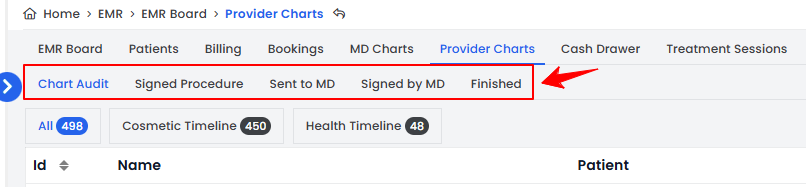 Note“Chart Audit” are the procedures that are under review and require auditing or verification before further processing. “Signed Procedure” are the procedures that have been signed off by the provider who performed them, confirming their completion. “Sent to MD” are the procedures that have been submitted to an MD for review or approval. “Signed by MD” are the procedures that have been reviewed and officially approved by a Medical Doctor. “Finished” are the procedures that have been fully completed and require no further review or action.
 -
In the Provider Charts list, each procedure displays details such as MD Name, Procedure Name, and Patient Name. From the Chart Audit list, click the three dots next to a specific procedure and select “View” or “Edit” to access or modify its details.
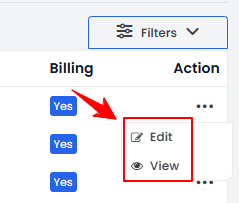 NoteOnly procedures in the Chart Audit list can be edited, as they are still under review. Procedures in the other lists—Signed Procedure, Sent to MD, Signed by MD, and Finished—can only be viewed, not edited, since they are either signed, approved, or completed.
 -
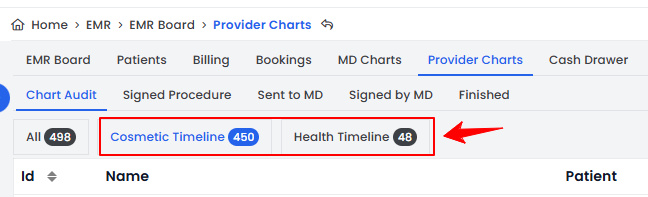
Click the “Cosmetic Timeline” or “Health Timeline” tabs to view a list of only cosmetic procedures or only health procedures, for easier tracking and review.
 You have successfully reviewed the Provider Charts!
You’re all set
That’s every step of “Review Provider Charts”. Up next: How to Assign a Service to a Provider?.