How to Join Meeting for a Virtual Service?
This user guide explains the steps to join a virtual service meeting, guiding users through accessing the meeting link, logging in, and connecting successfully. It ensures a smooth and hassle-free virtual appointment experience.
Understanding Terminologies
Virtual Service
A virtual service is a service offered remotely using digital technology, allowing patients and providers to interact, consult, or receive treatments online without being physically present in the same location.
Access this link: https://digimedspa.com/ap2/products
Join Meeting for a Virtual Service
- To join a virtual service meeting, the user must first create and book the virtual service.Note: For step-by-step instructions on creating and scheduling a virtual service, refer to the user guide “How to Create and Book a Virtual Service?”
- The booked virtual service will appear in the “Scheduled” section on the EMR Board. Click “Check-in” to move the booking to the “Checked In” section.
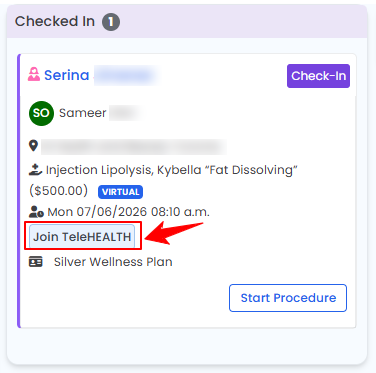
- Once the booking is under “Checked In,” click the “Join TeleHEALTH” button to start the meeting.

- Enter your login details, and you will successfully join the virtual meeting.
You have successfully joined the meeting for a virtual service!
Related Articles
Send Booking Confirmation Notification
This user guide explains how to send booking confirmation notifications to patients after an appo... How to Send Pre / Post-Treatment Instructions for a Booking
This user guide provides step-by-step instructions on how to send Pre- or Post-Treatment Instruct... How to Create and Book a Virtual Service
This user guide provides step-by-step instructions for creating virtual services and booking virt...
This user guide explains how to send booking confirmation notifications to patients after an appo... How to Send Pre / Post-Treatment Instructions for a Booking
This user guide provides step-by-step instructions on how to send Pre- or Post-Treatment Instruct... How to Create and Book a Virtual Service
This user guide provides step-by-step instructions for creating virtual services and booking virt...
Table of Contents
Categories
Patients
22 articles
Providers
14 articles
Services & Bundles
7 articles
Clinical Documentation
12 articles
Procedure Management
18 articles
Scheduling & Online Booking
21 articles
Products & Inventory Management
12 articles
Employees
3 articles
e-Prescribing
4 articles
Patient Billing
17 articles
POS
4 articles
Referrals & Settings
2 articles
Membership
3 articles
Promotions
2 articles
Payment Processing
2 articles
Credit Ledgers
1 article
Reports
14 articles
Treatment Plans
4 articles
Gift Cards
0 articles
Access Lab
0 articles
No subcategories available.
No subcategories available.