How to Check out without Billing?
This user guide explains how to complete a checkout process without generating a bill, ideal for complimentary services or internal use. It walks users through the steps to finalize appointments while keeping billing records unaffected.
Understanding Terminologies
Checkout
Checkout is the process of finalizing a service or appointment after it has been completed, confirming details such as services provided, products used, and closing the visit in the system.
Billing
Billing is the process of calculating charges for services or products and generating an invoice or payment request for the patient, including taxes, discounts, and payment records.
Check out without Billing During In Procedure Phase
- On the EMR Board, navigate to the bookings that are currently listed in the “In Procedure” step.
- Hover over “Procedure Actions” and select “Checkout without Billing” from the dropdown menu.

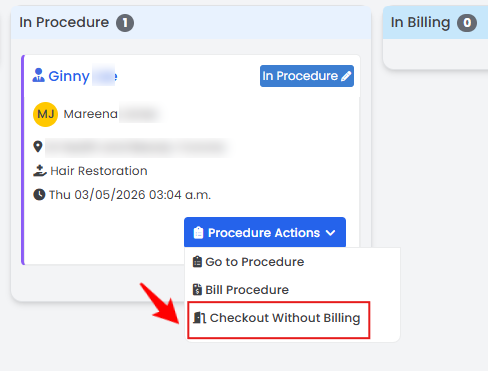
The booking has been successfully checked out without billing!
Check out without Billing During In Billing Phase
- On the EMR Board, navigate to the bookings that are currently listed in the “In Billing” step.
- Hover over “Bill Actions” and select “Checkout without Billing” from the dropdown menu.
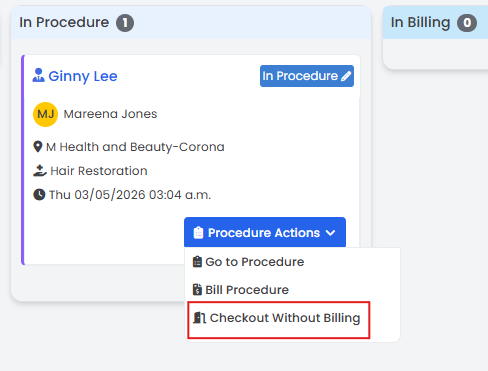
- The bookings will be updated and moved to the “Checked Out” stage.
The booking has been successfully checked out without billing!
Related Articles
How to Activate Super Invoice?
This user guide explains how to activate super invoices within the DigiMEDSPA Portal. and how to ... How to Get a Refund for a Patient?
This user guide provides step-by-step instructions on how to request and process both partial and... How to Manage a Patient Wallet?
This user guide explains how to manage billing and payments through a patient’s profile in the Di... How to Add Additional Charges to an Invoice?
This guide explains how to add additional charges to an invoice. It outlines the steps to include...
This user guide explains how to activate super invoices within the DigiMEDSPA Portal. and how to ... How to Get a Refund for a Patient?
This user guide provides step-by-step instructions on how to request and process both partial and... How to Manage a Patient Wallet?
This user guide explains how to manage billing and payments through a patient’s profile in the Di... How to Add Additional Charges to an Invoice?
This guide explains how to add additional charges to an invoice. It outlines the steps to include...
Table of Contents
Categories
Patients
22 articles
Providers
14 articles
Services & Bundles
7 articles
Clinical Documentation
12 articles
Procedure Management
18 articles
Scheduling & Online Booking
21 articles
Products & Inventory Management
12 articles
Employees
3 articles
e-Prescribing
4 articles
Patient Billing
17 articles
POS
4 articles
Referrals & Settings
2 articles
Membership
3 articles
Promotions
2 articles
Payment Processing
2 articles
Credit Ledgers
1 article
Reports
14 articles
Treatment Plans
4 articles
Gift Cards
0 articles
Access Lab
0 articles
No subcategories available.
No subcategories available.