How Can a Patient Change Password for Their Account?
This user guide provides step-by-step instructions on how patients can change their password in the DigiMEDSPA Portal.
Understanding Terminologies
Account
A patient account in the DigiMEDSPA Portal is a registered profile that provides the patient access to the system. It includes personal details, login credentials (email and password), and permissions specific to patient activities, such as booking appointments, accessing medical records, and managing personal information.
Password
A password is a secure, patient-created authentication credential used to log into the DigiMEDSPA Portal. It must meet security requirements to ensure account protection. Patients can change their passwords to maintain security and prevent unauthorized access.
How can a Patient Change Password for Their Account?
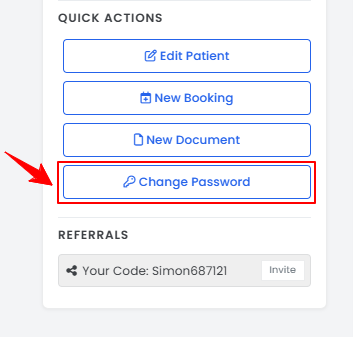
- On the Patient Portal, patients can easily update their password by clicking “Change Password” in the Quick Actions menu on the left side of the screen.

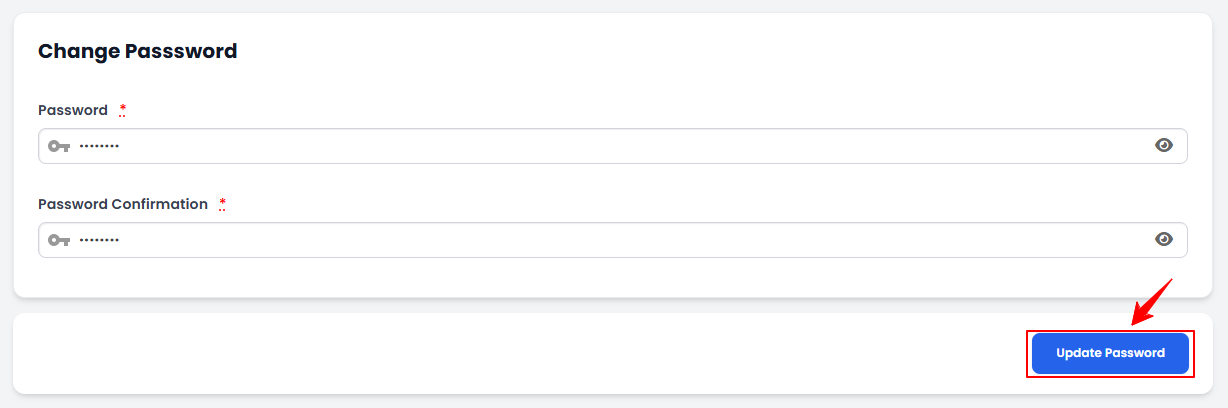
- Enter your new password, then re-enter it in the Password Confirmation field. Click "Update Password" to save the new password.
The password has been changed successfully!
Related Articles
Add / View / Edit / Delete Patient Vitals
This user guide provides step-by-step instructions on how to manage patient vital information wit... How to Pin a Document in the Patient Profile
This user guide explains how to pin a document in a patient’s profile in the DigiMEDSPA portal. P... View Patient’s Vitals Graph
This user guide explains how to view a patient’s vitals graph within the DigiMEDSPA Portal. It he... How to View a Patient’s Good Faith Exam in Their Profile
This user guide explains how to view a patient’s Good Faith Exam through their profile in the Dig...
This user guide provides step-by-step instructions on how to manage patient vital information wit... How to Pin a Document in the Patient Profile
This user guide explains how to pin a document in a patient’s profile in the DigiMEDSPA portal. P... View Patient’s Vitals Graph
This user guide explains how to view a patient’s vitals graph within the DigiMEDSPA Portal. It he... How to View a Patient’s Good Faith Exam in Their Profile
This user guide explains how to view a patient’s Good Faith Exam through their profile in the Dig...
Table of Contents
Categories
Patients
22 articles
Providers
14 articles
Services & Bundles
7 articles
Clinical Documentation
12 articles
Procedure Management
18 articles
Scheduling & Online Booking
21 articles
Products & Inventory Management
12 articles
Employees
3 articles
e-Prescribing
4 articles
Patient Billing
17 articles
POS
4 articles
Referrals & Settings
2 articles
Membership
3 articles
Promotions
2 articles
Payment Processing
2 articles
Credit Ledgers
1 article
Reports
14 articles
Treatment Plans
4 articles
Gift Cards
0 articles
Access Lab
0 articles
No subcategories available.
No subcategories available.