

Understanding Terminologies
- Service
Services refer to cosmetic and health procedures offered at Med SPAs, such as facials, laser treatments, injectables, body contouring etc.
- Service Bundle
Service bundles refer to a combination of multiple procedures or services offered together as a package to patients by Med SPAs.
Part 1 of 4
Disable a Service
-
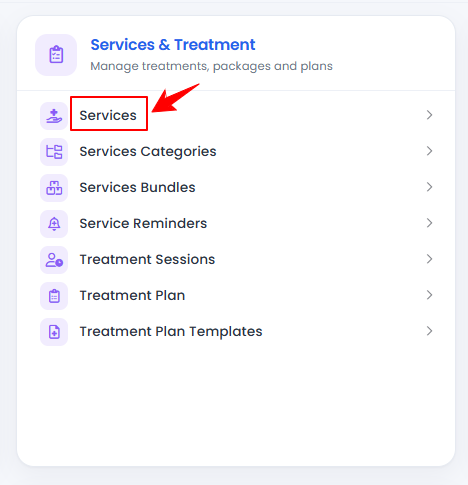
The user can disable a service by accessing the Services List Screen. From the “Admin” dashboard, click on “Services” under “Services & Treatment,” or search services in the top search bar.
-
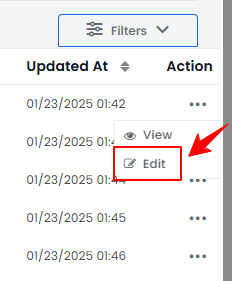
From the services list, click on three dots under the action column and select "Edit" for the specific service.
-
To disable a service, change its status to “Disable,” in Step 1, click “Next” to proceed through steps, and then click “Submit” at the final step to save the changes.
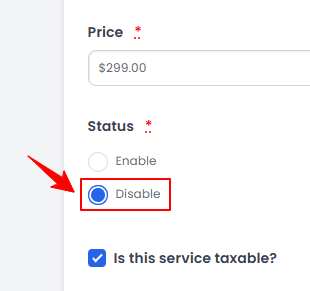 Note“Status” refers to a service's current state or condition within the portal, indicating whether it is active, inactive, or undergoing changes. When a service is set to "Enable," it is active and available for use. Users can access and book it as part of their treatment options. When a service is set to "Disable," it becomes inactive and unavailable for selection, preventing users from booking or accessing it until re-enabled.
Refer to our “Add / View / Edit a Service” user guide for detailed instructions on adding and editing services.The service has been successfully disabled!
Part 2 of 4
View Disabled Services
-
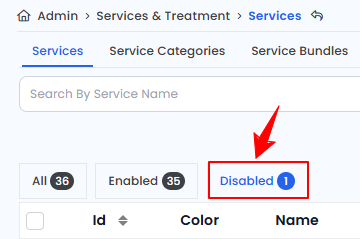
To view disabled services, go to the Service List Screen and click “Disabled” on the top scope bar. This will display a list of all disabled services.
-
The status of the services can also be viewed in the “All” list. The “Status” column shows whether a service is enabled or disabled currently.
Part 3 of 4
Disable a Service Bundle
-
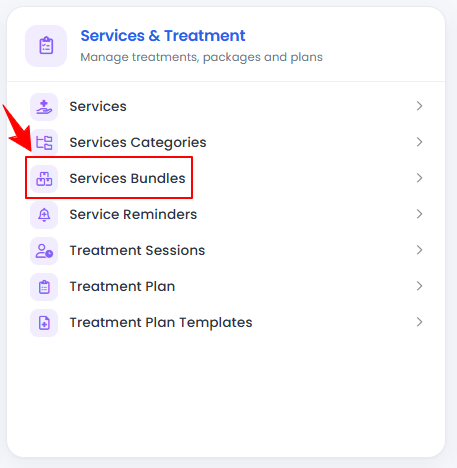
The user can disable a service bundle by accessing the Service Bundles List Screen. From the “Admin” dashboard, click on “Service Bundles” under “Services & Treatment,” or search service bundles in the top search bar.
-
From the service bundle list, click on three dots under the action column and select "Edit" for the specific service bundle.
-
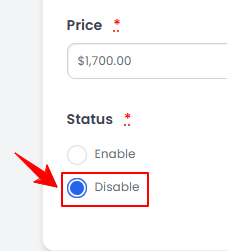
The service bundle form will open in edit mode. Change the Status to “Disable” and click "Update Service Bundle" to save your updates.
 NoteRefer to our “Add / View / Edit Service Bundle” user guide for detailed instructions on adding and editing service bundles.
The service bundle has been successfully disabled!
Part 4 of 4
View Disabled Services
-
To view disabled service bundles, go to the Service Bundles List Screen and click “Disabled” on the top scope bar. This will display a list of all disabled service bundles.
-
The status of the service bundles can also be viewed in the “All” list. The “Status” column shows whether a service bundle is enabled or disabled currently.
You’re all set
That’s every step of “Disable a Service and Service Bundle”. Up next: Managing Prepayments for a Service (Service Deposits).