Login
Login DigiMEDSPA EMR
 DigiMEDSPA CONNECT ™
How Can a Patient Send Chat?
This user guide explains how patients can easily send emails or start chats through the DigiMEDSPA Portal to communicate with the clinic.
Understanding Terminologies
Chat
Chat is a quick, in-app messaging feature that enables patients to communicate with clinic staff in real time or near real time for faster questions and responses.
How Can a Patient Send Chat?
- To send a chat, the patient must log in to their DigiMEDSPA account. Enter your username and password, then click “Login.”
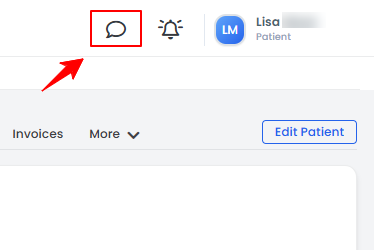
- Once logged in, patients can start a chat with clinic staff by accessing the “Chat” icon from two points.
- From the Top Menu Navigation, click the “Chat” icon.

- On the left panel of the patient profile, click the “Chat” icon.
- From the Top Menu Navigation, click the “Chat” icon.
- To start a new chat, click on the “+ New Chat” button in the top right corner of the screen.
- Search for the name of the user you want to chat with.
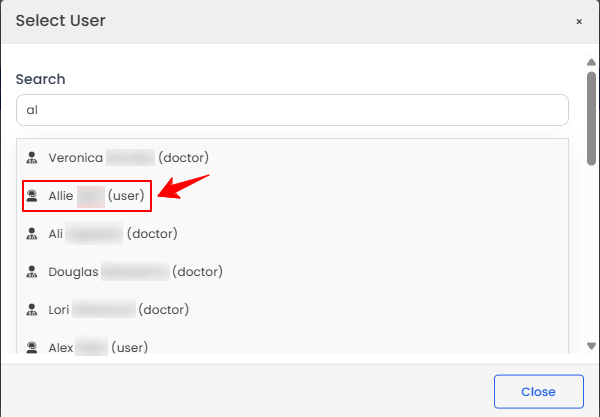
- Once you've selected the user you want to chat with, type your message and click the arrow icon on the right to send it.
 Note: To attach a document or file in the chat, click the file icon next to the arrow icon, then select the desired file from your device.
 - Your sent message will appear in the chat window, and the conversation will be listed on the left side of the screen.
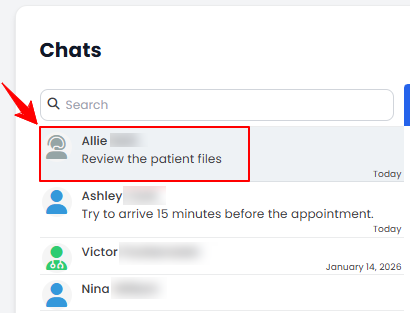 Note: Click the refresh icon at the top right of the chat window to reload the messages.
The new chat has been successfully sent!
Related Articles
Add / View / Edit / Delete Patient Vitals
This user guide provides step-by-step instructions on how to manage patient vital information wit... How to Pin a Document in the Patient Profile
This user guide explains how to pin a document in a patient’s profile in the DigiMEDSPA portal. P... View Patient’s Vitals Graph
This user guide explains how to view a patient’s vitals graph within the DigiMEDSPA Portal. It he... How to View a Patient’s Good Faith Exam in Their Profile
This user guide explains how to view a patient’s Good Faith Exam through their profile in the Dig...
This user guide provides step-by-step instructions on how to manage patient vital information wit... How to Pin a Document in the Patient Profile
This user guide explains how to pin a document in a patient’s profile in the DigiMEDSPA portal. P... View Patient’s Vitals Graph
This user guide explains how to view a patient’s vitals graph within the DigiMEDSPA Portal. It he... How to View a Patient’s Good Faith Exam in Their Profile
This user guide explains how to view a patient’s Good Faith Exam through their profile in the Dig...
Table of Contents
Categories
Patients
22 articles
Providers
14 articles
Services & Bundles
7 articles
Clinical Documentation
12 articles
Procedure Management
18 articles
Scheduling & Online Booking
21 articles
Products & Inventory Management
12 articles
Employees
3 articles
e-Prescribing
4 articles
Patient Billing
17 articles
POS
4 articles
Referrals & Settings
2 articles
Membership
3 articles
Promotions
2 articles
Payment Processing
2 articles
Credit Ledgers
1 article
Reports
14 articles
Treatment Plans
4 articles
Gift Cards
0 articles
Access Lab
0 articles
No subcategories available.
No subcategories available.