


View Referral Logs
This guide explains how to access and review referral logs to track referral activity. It helps monitor referrals, view details, and ensure accurate recordkeeping.
Understanding Terminologies
Referral Logs
Referral logs track referral activities, including details of referred individuals, referrers, dates, statuses, and any associated rewards or commissions. These logs help monitor and manage the referral process efficiently.
View Referral Logs
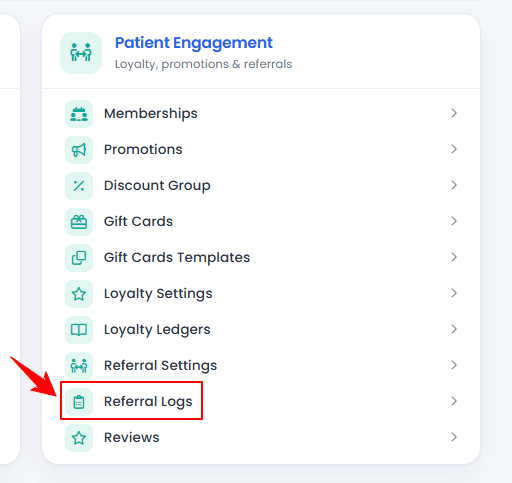
- From the “Admin” dashboard, click on “Referral Logs” under “Patient Engagement,” or search referral logs in the top search bar.

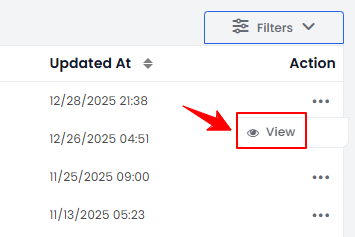
- To view a referral log, click anywhere on the referral log’s data in the listing, or click the three dots in the action column next to the specific referral log and select “View.”
- The Referral Log View Screen will display the complete Referral Log Details, including Referrer, Referee, Referrer Amount, Referee Amount, and Status.Note: A “Referrer” is a person or entity that refers someone to a service or business. A “Referee” is a person who is referred to the service or business. The “Referrer Amount” is the reward or commission provided to the referrer for a successful referral. The “Referee Amount” is any discount, benefit, or incentive provided to the referee. “Status” is the current state of the referral (e.g., Pending, Received, Approved, or Rejected).
Related Articles
Review Inventory Utilization Report
This user guide explains how to review inventory utilization, including tracking total active pro... How to Review Revenue by Product Type & Category in Inventory Reports?
This user guide explains how to review revenue by product type and category within inventory repo... How to Review Provider Revenue by Location?
This user guide explains how to review provider revenue by location, helping users analyze indivi... How to Review Service Revenue by Location?
This user guide explains how to review service revenue by location, helping users clearly compare...
This user guide explains how to review inventory utilization, including tracking total active pro... How to Review Revenue by Product Type & Category in Inventory Reports?
This user guide explains how to review revenue by product type and category within inventory repo... How to Review Provider Revenue by Location?
This user guide explains how to review provider revenue by location, helping users analyze indivi... How to Review Service Revenue by Location?
This user guide explains how to review service revenue by location, helping users clearly compare...
Table of Contents
Categories
Patients
22 articles
Providers
14 articles
Services & Bundles
7 articles
Clinical Documentation
12 articles
Procedure Management
18 articles
Scheduling & Online Booking
21 articles
Products & Inventory Management
12 articles
Employees
3 articles
e-Prescribing
4 articles
Patient Billing
17 articles
POS
4 articles
Referrals & Settings
2 articles
Membership
3 articles
Promotions
2 articles
Payment Processing
2 articles
Credit Ledgers
1 article
Reports
14 articles
Treatment Plans
4 articles
Gift Cards
0 articles
Access Lab
0 articles
No subcategories available.
No subcategories available.