View Provider Statistics
This user guide explains how to view provider statistics in the DigiMEDSPA portal. From a provider’s profile, you can easily review their weekly and monthly performance, including the number of bookings and procedures completed. This helps you track productivity and monitor provider activity at a glance.
Understanding Terminologies
Provider Statistics
Provider statistics refer to the performance data of a specific provider, showing the number of bookings and procedures they have completed within a selected time period—such as weekly or monthly. It also displays the provider’s upcoming bookings and procedures for the current date and week, helping you track productivity, patient activity, and upcoming workload.
How to a View Provider’s Statistics
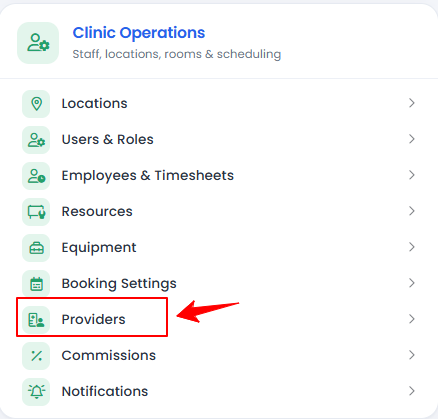
- Provider’s statistics can be viewed through the Providers List Screen. From the “Admin” dashboard, click on “Providers” under “Clinic Operations,” or search providers in the top search bar.

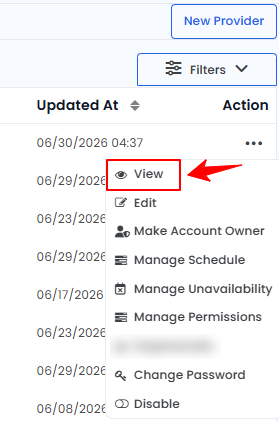
- To view a specific provider’s statistics from the list, click the three dots in the action column and select "View," or simply click anywhere on the provider’s data.
- The provider’s profile will open, displaying all their details. Scroll down to the final section labeled Provider Statistics, where you will find two subsections: Procedures and Bookings.
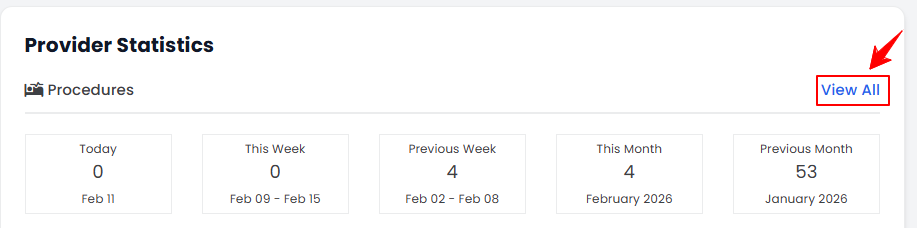
- The Procedures section displays the number of procedures completed today, this week, previous week, this month, and previous month. To view a detailed list of all procedures performed by this provider, click “View All” in the top-right corner of the Procedures section.
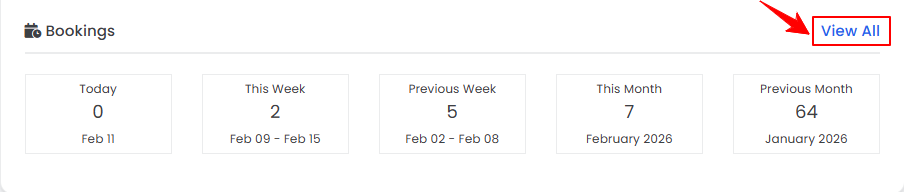
- The Bookings section shows the number of bookings for today, this week, previous week, this month, and previous month. To view a detailed list of all bookings for this provider, click “View All” in the top-right corner of the Bookings section.
You have successfully viewed the provider statistics!
- The Procedures section displays the number of procedures completed today, this week, previous week, this month, and previous month. To view a detailed list of all procedures performed by this provider, click “View All” in the top-right corner of the Procedures section.