View Notification Logs
This user guide provides instructions for viewing notification logs, allowing users to track sent messages, delivery statuses, and timestamps for efficient monitoring and troubleshooting.
Understanding Terminologies
Notification Logs
Notification logs track the details of sent notifications, including timestamps, delivery status, recipients, and message content. These logs help monitor communication history and identify any issues with message delivery.
View Notification Logs
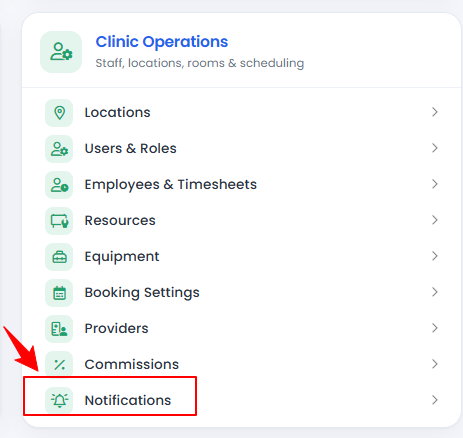
- From the “Admin” dashboard, click on “Notification logs” under “Clinic Operations,” or search notification logs in the top search bar.

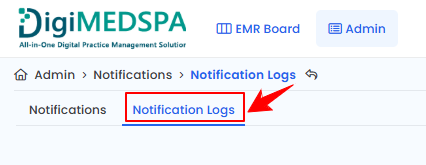
- By default, you will be directed to the “Notifications” tab. Click “Notification Logs” to view the notification logs.
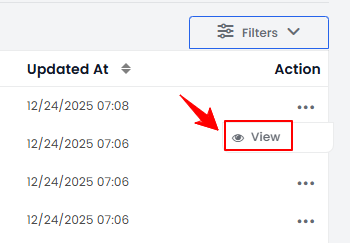
- To view a notification log, click anywhere on the notification log data or click the three dots under the action column and select "View" for the specific notification log.
- The Notification Log Details Screen displays key information, including the name for the User and Notification, Email, Phone Number, and the content of both Email and SMS messages.Note: The “Notification Name” is a unique identifier or title assigned to each notification. It helps users distinguish and manage different types of notifications within the system.
Related Articles
Review Inventory Utilization Report
This user guide explains how to review inventory utilization, including tracking total active pro... How to Review Revenue by Product Type & Category in Inventory Reports?
This user guide explains how to review revenue by product type and category within inventory repo... How to Review Provider Revenue by Location?
This user guide explains how to review provider revenue by location, helping users analyze indivi... How to Review Service Revenue by Location?
This user guide explains how to review service revenue by location, helping users clearly compare...
This user guide explains how to review inventory utilization, including tracking total active pro... How to Review Revenue by Product Type & Category in Inventory Reports?
This user guide explains how to review revenue by product type and category within inventory repo... How to Review Provider Revenue by Location?
This user guide explains how to review provider revenue by location, helping users analyze indivi... How to Review Service Revenue by Location?
This user guide explains how to review service revenue by location, helping users clearly compare...
Table of Contents
Categories
Patients
22 articles
Providers
14 articles
Services & Bundles
7 articles
Clinical Documentation
12 articles
Procedure Management
18 articles
Scheduling & Online Booking
21 articles
Products & Inventory Management
12 articles
Employees
3 articles
e-Prescribing
4 articles
Patient Billing
17 articles
POS
4 articles
Referrals & Settings
2 articles
Membership
3 articles
Promotions
2 articles
Payment Processing
2 articles
Credit Ledgers
1 article
Reports
14 articles
Treatment Plans
4 articles
Gift Cards
0 articles
Access Lab
0 articles
No subcategories available.
No subcategories available.