


Manage Referral Settings
This guide provides step-by-step instructions for configuring and managing referral settings to support efficient tracking and processing within the DigiMEDSPA Portal.
Understanding Terminologies
Referral Settings
Referral settings refer to the configurable options that define how referrals are tracked, processed, and coordinated within the system. These settings allow users to customize referral workflows and ensure accurate recordkeeping for seamless patient management.
Turn On and Set Referral Settings
- From the “Admin” dashboard, click on “Referral Settings” under “Patient Engagement,” or search referral settings in the top search bar.

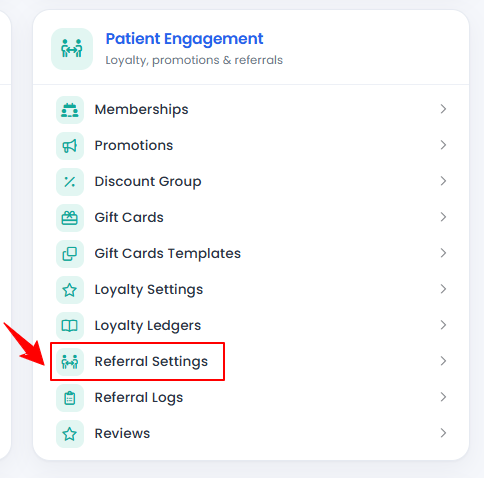
- If the referral settings are turned ‘’OFF,’’ select "ON" to enable them.
- Once enabled, enter the required details, including the Amount, Referee Percentage, and Referrer Percentage. Click "Submit" to save your settings.
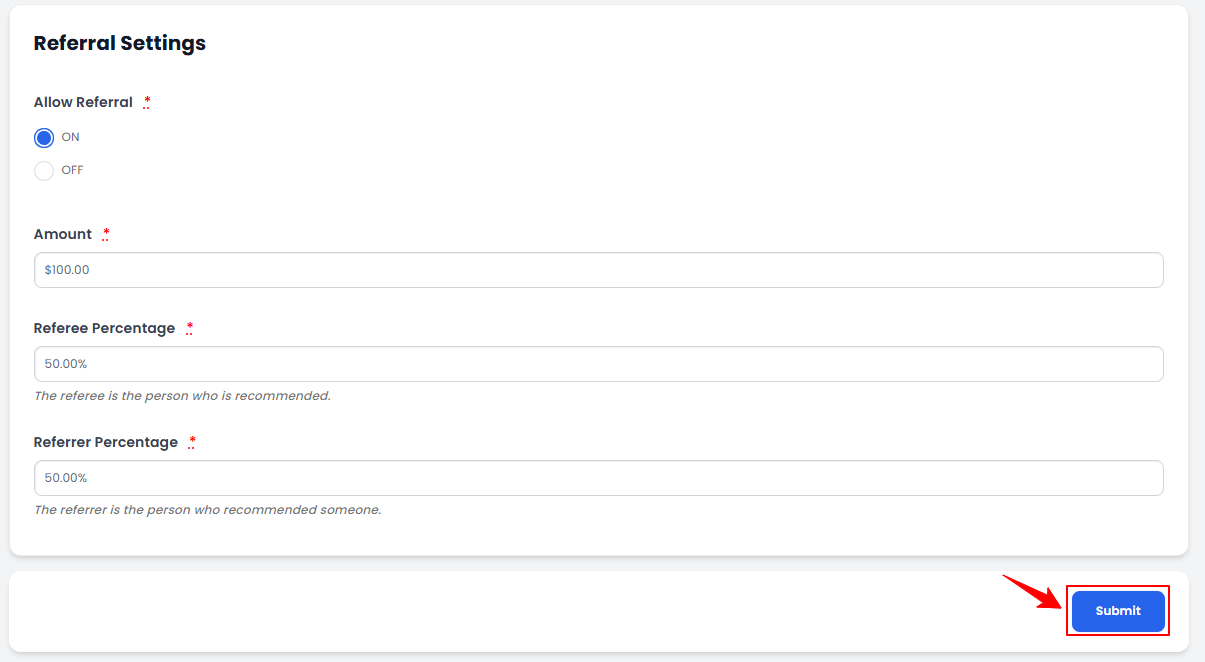 Note: The “Amount” is the total value or commission allocated for the referral. The “Referee Percentage” is the percentage of the referral amount awarded to the person receiving the service. The “Referrer Percentage” is the referral amount awarded to the person who referred the service.
Your referral settings have been saved successfully!
Related Articles
Review Inventory Utilization Report
This user guide explains how to review inventory utilization, including tracking total active pro... How to Review Revenue by Product Type & Category in Inventory Reports?
This user guide explains how to review revenue by product type and category within inventory repo... How to Review Provider Revenue by Location?
This user guide explains how to review provider revenue by location, helping users analyze indivi... How to Review Service Revenue by Location?
This user guide explains how to review service revenue by location, helping users clearly compare...
This user guide explains how to review inventory utilization, including tracking total active pro... How to Review Revenue by Product Type & Category in Inventory Reports?
This user guide explains how to review revenue by product type and category within inventory repo... How to Review Provider Revenue by Location?
This user guide explains how to review provider revenue by location, helping users analyze indivi... How to Review Service Revenue by Location?
This user guide explains how to review service revenue by location, helping users clearly compare...
Table of Contents
Categories
Patients
22 articles
Providers
14 articles
Services & Bundles
7 articles
Clinical Documentation
12 articles
Procedure Management
18 articles
Scheduling & Online Booking
21 articles
Products & Inventory Management
12 articles
Employees
3 articles
e-Prescribing
4 articles
Patient Billing
17 articles
POS
4 articles
Referrals & Settings
2 articles
Membership
3 articles
Promotions
2 articles
Payment Processing
2 articles
Credit Ledgers
1 article
Reports
14 articles
Treatment Plans
4 articles
Gift Cards
0 articles
Access Lab
0 articles
No subcategories available.
No subcategories available.