How to Join Meeting for a Virtual Service?
This user guide explains the steps to join a virtual service meeting, guiding users through accessing the meeting link, logging in, and connecting successfully. It ensures a smooth and hassle-free virtual appointment experience.
Understanding Terminologies
Virtual Service
A virtual service is a service offered remotely using digital technology, allowing patients and providers to interact, consult, or receive treatments online without being physically present in the same location.
Access this link: https://digimedspa.com/ap2/products
Join Meeting for a Virtual Service
- To join a virtual service meeting, the user must first create and book the virtual service.Note: For step-by-step instructions on creating and scheduling a virtual service, refer to the user guide “How to Create and Book a Virtual Service?”
- The booked virtual service will appear in the “Scheduled” section on the EMR Board. Click “Check-in” to move the booking to the “Checked In” section.
- Once the booking is under “Checked In,” click the “Join TeleHEALTH” button to start the meeting.

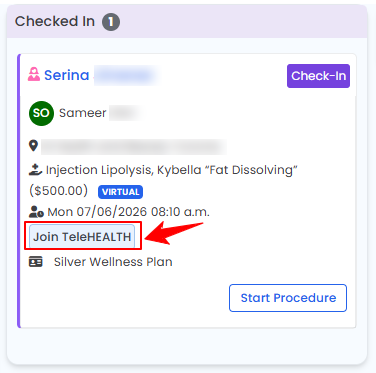
- Enter your login details, and you will successfully join the virtual meeting.
You have successfully joined the meeting for a virtual service!
Related Articles
Review Inventory Utilization Report
This user guide explains how to review inventory utilization, including tracking total active pro... How to Review Revenue by Product Type & Category in Inventory Reports?
This user guide explains how to review revenue by product type and category within inventory repo... How to Review Provider Revenue by Location?
This user guide explains how to review provider revenue by location, helping users analyze indivi... How to Review Service Revenue by Location?
This user guide explains how to review service revenue by location, helping users clearly compare...
This user guide explains how to review inventory utilization, including tracking total active pro... How to Review Revenue by Product Type & Category in Inventory Reports?
This user guide explains how to review revenue by product type and category within inventory repo... How to Review Provider Revenue by Location?
This user guide explains how to review provider revenue by location, helping users analyze indivi... How to Review Service Revenue by Location?
This user guide explains how to review service revenue by location, helping users clearly compare...
Table of Contents
Categories
Patients
22 articles
Providers
14 articles
Services & Bundles
7 articles
Clinical Documentation
12 articles
Procedure Management
18 articles
Scheduling & Online Booking
21 articles
Products & Inventory Management
12 articles
Employees
3 articles
e-Prescribing
4 articles
Patient Billing
17 articles
POS
4 articles
Referrals & Settings
2 articles
Membership
3 articles
Promotions
2 articles
Payment Processing
2 articles
Credit Ledgers
1 article
Reports
14 articles
Treatment Plans
4 articles
Gift Cards
0 articles
Access Lab
0 articles
No subcategories available.
No subcategories available.