How to Add Additional Charges to an Invoice?
This guide explains how to add additional charges to an invoice. It outlines the steps to include extra fees or costs so the final invoice reflects the correct total amount.
Understanding Terminologies
Additional Charges
Additional charges are the extra fees added to the total cost of a product or service, such as taxes, service fees, or other applicable costs.
Invoice
A document issued to a patient that lists the products or services provided along with their prices and the total amount due for payment.
Add Additional Charges to an Invoice
- The user can access the Invoices List Screen from two entry points:
- From the EMR Admin, click on “Invoices” under “Patient Billing.”

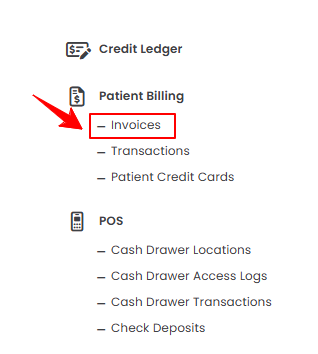
- From the Left Navigation, open the “EMR Admin” dropdown menu, select “Patient Billing,” and then choose “Invoices” from the subsequent dropdown menu. Alternatively, you can type “Invoices” into the search bar in the Left Navigation.
- From the EMR Admin, click on “Invoices” under “Patient Billing.”
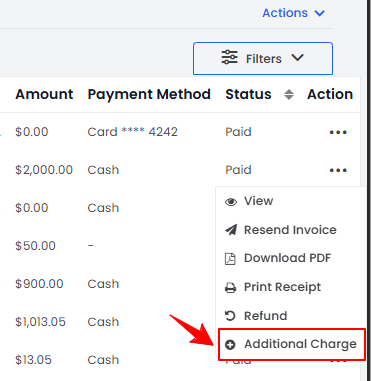
- A list of all invoices will be displayed. From this list, click the three dots in the Action column next to the invoice you want to download, and select “Additional Charge.”
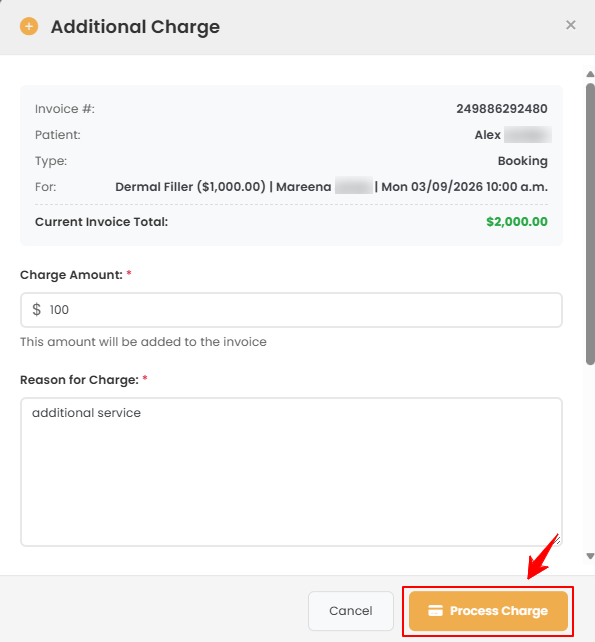
- Enter the Charge Amount and the Reason for the charge. Once completed, click the “Process Charge” button to proceed.
- A confirmation pop-up will appear. Click “OK” to confirm and proceed with the payment processing.
The additional charge has been added to the invoice!
Related Articles
Review Inventory Utilization Report
This user guide explains how to review inventory utilization, including tracking total active pro... How to Review Revenue by Product Type & Category in Inventory Reports?
This user guide explains how to review revenue by product type and category within inventory repo... How to Review Provider Revenue by Location?
This user guide explains how to review provider revenue by location, helping users analyze indivi... How to Review Service Revenue by Location?
This user guide explains how to review service revenue by location, helping users clearly compare...
This user guide explains how to review inventory utilization, including tracking total active pro... How to Review Revenue by Product Type & Category in Inventory Reports?
This user guide explains how to review revenue by product type and category within inventory repo... How to Review Provider Revenue by Location?
This user guide explains how to review provider revenue by location, helping users analyze indivi... How to Review Service Revenue by Location?
This user guide explains how to review service revenue by location, helping users clearly compare...
Table of Contents
Categories
Patients
22 articles
Providers
14 articles
Services & Bundles
7 articles
Clinical Documentation
12 articles
Procedure Management
18 articles
Scheduling & Online Booking
21 articles
Products & Inventory Management
12 articles
Employees
3 articles
e-Prescribing
4 articles
Patient Billing
17 articles
POS
4 articles
Referrals & Settings
2 articles
Membership
3 articles
Promotions
2 articles
Payment Processing
2 articles
Credit Ledgers
1 article
Reports
14 articles
Treatment Plans
4 articles
Gift Cards
0 articles
Access Lab
0 articles
No subcategories available.
No subcategories available.