How Can a Patient Send Chat?
This user guide explains how patients can easily send emails or start chats through the DigiMEDSPA Portal to communicate with the clinic.
Understanding Terminologies
Chat
Chat is a quick, in-app messaging feature that enables patients to communicate with clinic staff in real time or near real time for faster questions and responses.
How Can a Patient Send Chat?
- To send a chat, the patient must log in to their DigiMEDSPA account. Enter your username and password, then click “Login.”
- Once logged in, patients can start a chat with clinic staff by accessing the “Chat” icon from two points.
- From the Top Menu Navigation, click the “Chat” icon.

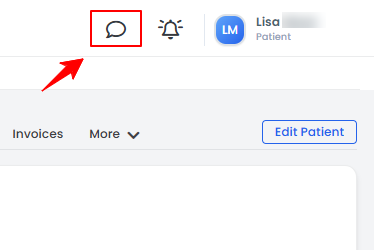
- On the left panel of the patient profile, click the “Chat” icon.
- From the Top Menu Navigation, click the “Chat” icon.
- To start a new chat, click on the “+ New Chat” button in the top right corner of the screen.
- Search for the name of the user you want to chat with.
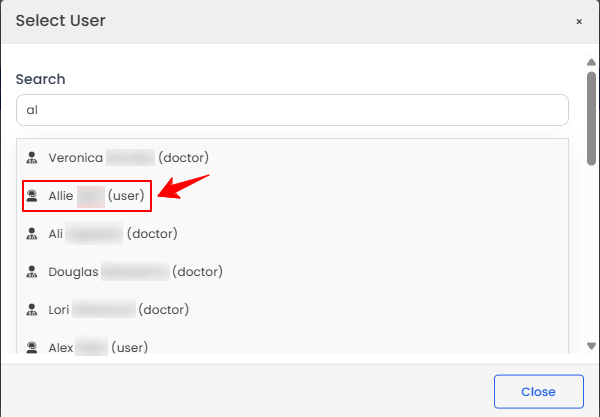
- Once you've selected the user you want to chat with, type your message and click the arrow icon on the right to send it.
 Note: To attach a document or file in the chat, click the file icon next to the arrow icon, then select the desired file from your device.
 - Your sent message will appear in the chat window, and the conversation will be listed on the left side of the screen.
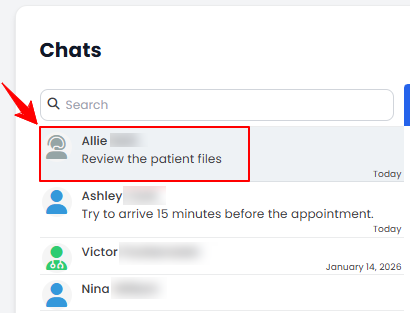 Note: Click the refresh icon at the top right of the chat window to reload the messages.
The new chat has been successfully sent!
Related Articles
Review Inventory Utilization Report
This user guide explains how to review inventory utilization, including tracking total active pro... How to Review Revenue by Product Type & Category in Inventory Reports?
This user guide explains how to review revenue by product type and category within inventory repo... How to Review Provider Revenue by Location?
This user guide explains how to review provider revenue by location, helping users analyze indivi... How to Review Service Revenue by Location?
This user guide explains how to review service revenue by location, helping users clearly compare...
This user guide explains how to review inventory utilization, including tracking total active pro... How to Review Revenue by Product Type & Category in Inventory Reports?
This user guide explains how to review revenue by product type and category within inventory repo... How to Review Provider Revenue by Location?
This user guide explains how to review provider revenue by location, helping users analyze indivi... How to Review Service Revenue by Location?
This user guide explains how to review service revenue by location, helping users clearly compare...
Table of Contents
Categories
Patients
22 articles
Providers
14 articles
Services & Bundles
7 articles
Clinical Documentation
12 articles
Procedure Management
18 articles
Scheduling & Online Booking
21 articles
Products & Inventory Management
12 articles
Employees
3 articles
e-Prescribing
4 articles
Patient Billing
17 articles
POS
4 articles
Referrals & Settings
2 articles
Membership
3 articles
Promotions
2 articles
Payment Processing
2 articles
Credit Ledgers
1 article
Reports
14 articles
Treatment Plans
4 articles
Gift Cards
0 articles
Access Lab
0 articles
No subcategories available.
No subcategories available.